No text in interface

I made a clean install of PHPStorm 2016.3.1 on Ubuntu and inserted a free trial code because the project I installed PHPStorm for isn't really long. However, when launching the software for the first time, I simply can't see any text
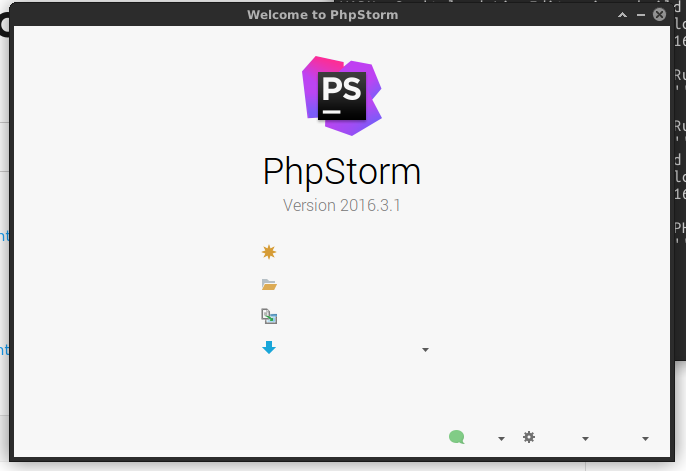
All i have is the icons. I personnalized my Ubuntu with XFCE but I didn't got any problem with any other sofwares.
Also I couldn't find any solution online. As anyone an idea?
Please sign in to leave a comment.
Please collect the IDE log, upload it somewhere and send us the link.
Probably, you're using the Oracle JDK instead of the built-in one.
Try using the mouse to select the area. My guess is the text is there, but its the same color as the background.
Eugène Mozodorov > I happen to also have the issue with Rubymine. I couldn't find the PHPStorm folder, so I got the log from RM, hope it'll be enough. Link in here
Michael Ussher > I thought too, but here is how my menu look with Rubymine:
Each of these " - " is supposed to be a menu. So I guess the text is simply missing, and the menu gets less large because of it.
Jd, if it's possible, I'd like to take a look at the PhpStorm log, it can be found under ~/.PhpStorm2016.3/system/logs, the file is called idea.log.
I had the same problem I fix it by changing the theme to GTK+