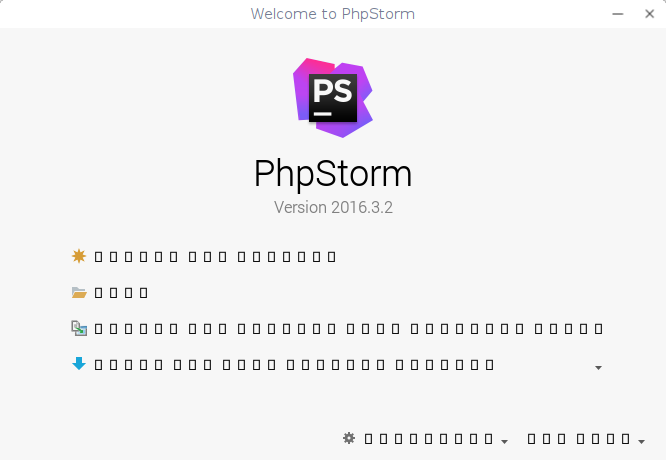
No text, Interface out, squares instead text

Hi all,
I just setup my environment, and my phpstorm is out :/
I'm using with Deepin linux (https://www.deepin.org/), i have installed correctly but when start the IDE texts are just squares.
Here is how appear for me, any idea what i can do ? after run the IDE loader (phpstorm.sh), getting this
'Picked up _JAVA_OPTIONS: -Dawt.useSystemAAFontSettings=gasp'
and after appear welcome screen with the wrong texts ... please any idea?
Please sign in to leave a comment.
Hi there,
Possible workaround is to override font used by the GUI Theme -- have a look at this similar thread: https://intellij-support.jetbrains.com/hc/en-us/community/posts/115000033344-PhpStorm-Forms-Menus-are-unreadable?page=1#community_comment_115000041650
P.S. No idea about actual issue reasons and how to "properly" fix it (at the OS level?) -- not a Linux user myself.
P.P.S. Based on "useSystemAAFontSettings" this could be related to the font anti-aliasing setting -- control elements that allow changing it are located on the same screen:
I had the same problem. I'm also using Deepin Linux 15.3.
I got it working by going in blindly and checking the "Override default fonts by (not recommended):" and changing the font!
Thanks @Bazanov !