Updated 2016 => 2017 - ES6 param destructuring indent changed and I can't find the setting to change it back.

Before the update (what I want):
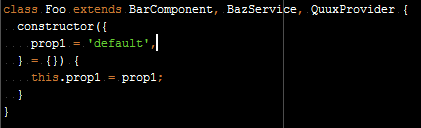
After the update (what I don't want):
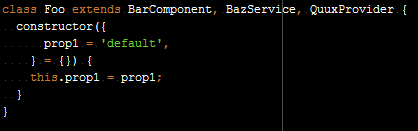
Right now I don't care if this is the wrong way to indent in this situation; the entire rest of the project uses the former style, and I don't want to have to go back and change them all right now, and I definitely don't want to have inconsistency.
I've been in the settings dialog for a while, searching and changing settings but my search has been fruitless.
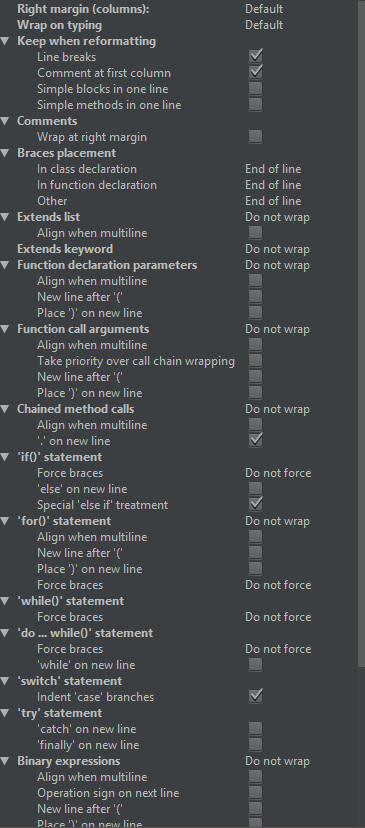
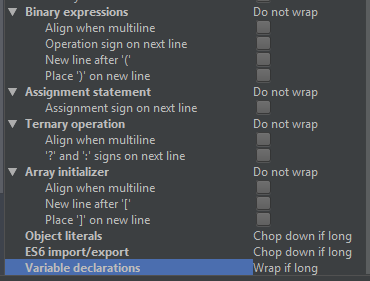
Here are my "Wrapping and Braces" settings:
Thanks!
Please sign in to leave a comment.
please see https://youtrack.jetbrains.com/issue/WEB-25899 - does the solution proposed there look good for you?
That does appear to be a valid solution, but I believe I have Smart Indent turned off (and I can't remember why) so I would perhaps be forced to deal with something else that I don't want to.
The preferred solution would be a setting for this with all the other indent settings.
>I have Smart Indent turned off
Smart Indent option you likely refer to (File | Settings | Editor | General | Smart Keys, Enter/Smart Indent) has nothing to do with this ticket. It's not about Enter behavior, it's about code reformatting
Thank you for the clarification. I take it this means there is currently no solution for me except to uninstall and use the previous version for now (if I want the desired behavior, that is)?
i can't offer any solution for 2017.1