IntelliJ Node support missing for single project

I'm having trouble with the Node coding assistance not working in one of our projects. I have deleted and re-created the project, even went as far as to wipe the entire workspace and check it out again from Git.
It's working perfectly in other projects, even new projects, just not this specific one (Which is the one I'm supposed to be working on so it's extremely frustrating). Where do I begin looking for something like this? Are there any logs I can enable to figure out the issue?
By coding assistance I mean the following: Highlighting global functions, displaying that it's a unit test (Green arrows) and so on. This is what it looks like in a working project:
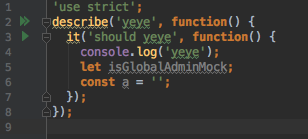
And the exact same code in the broken one:
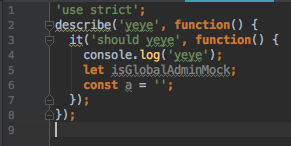
I'm running IntelliJ IDEA 2017.1.2 EAP and the issue might have started with an update a few days ago but I'm not sure. I know it used to work not too long ago.
Edit: I rolled myself back to IntelliJ IDEA 2017.1.1 and it's still broken.
Edit 2: It turns out that I didn't have mocha in my dependencies (However it was still installed since it was a nested dependency), adding it there solved the issue.
Please sign in to leave a comment.
>It turns out that I didn't have mocha in my dependencies (However it was still installed since it was a nested dependency), adding it there solved the issue.
This is the expected behavior:
- node_modules directory is excluded by default; only those direct dependencies that are explicitly listed in package.json are indexed for completion. If certain package is not listed, it's excluded => no highlighting/completion is available
- to enable 'green arrows' for your tests, Idea needs to know what test runner to use (karma, mocha, jest, etc.). The logic used for determining what test runner is available for a given test file is based on dependencies declarations in package.json.
So, to have your specs correctly detected, you need to make sure that 'mocha' is listed as a dependency/dev dependency in your package.json