Add an FTP deployment configuration for each of the folders you want to upload to.
TOOLS -> DEPLOYMENT -> CONFIGURATION -> +
You will only be able to set one of them as the default for use with 'automatic upload' but you can use normal upload to upload to the others where necessary.
Thanks for your input Michael, however, the main questions is: "How do I set up PHPStorm to accommodate this structure ... ?
I've looked through PHPStorm documentation but I cannot find any clear layout of folders. I've found PSR-0 and PSR-4, but they don't tell me anything in relation to an actual web site. I know that PHPStorm has it own files that keep track of the project that is being worked on, and those files seem to be in the same folder as the root folder for the web site. There is just not much clear documentation on this matter, at least that I can find.
One of us is confused, I think its you, forgive me if its me.
PSR-0 and PSR-4 are related to where the server looks for include files to execute the website. These don't have any relation to setting up phpstorm at all.
Guess: You have an existing system on a server somewhere that you want to edit. You're going to need to get that down to your local machine in order to work on whatever file you want to work on.
Normally for me there is 1 mapping between local folder structure (the phpstorm project) and the server.
eg: I setup a deployment configuration for mysite.com and then in phpstorm, open the REMOTE HOST panel to see what directory structure exists on the server.
From there if there are folders that I want to work on, I right click the folder and click either "download from here" or "sync with local"
that will synchronize just the files in the folder that im interested in. Here is a screenshot of the sync screen with differences between local and server
From there the work flow is: * get the latest copy into my local environment (for me via git) * work on the files, upload to server
You're wanting to have multiple locations to upload to. if you set them up as individual deployment configurations, then you can use the "right click -> upload to" then select which deployment configuration is the destination. Heres a screenshot of a single project which is mapped to multiple deployment configurations.
Thank you for your detailed input. I understand what you are saying, but that was not what I was looking for. However, I have figured out what it was I was looking for.

Add an FTP deployment configuration for each of the folders you want to upload to.
TOOLS -> DEPLOYMENT -> CONFIGURATION -> +
You will only be able to set one of them as the default for use with 'automatic upload' but you can use normal upload to upload to the others where necessary.
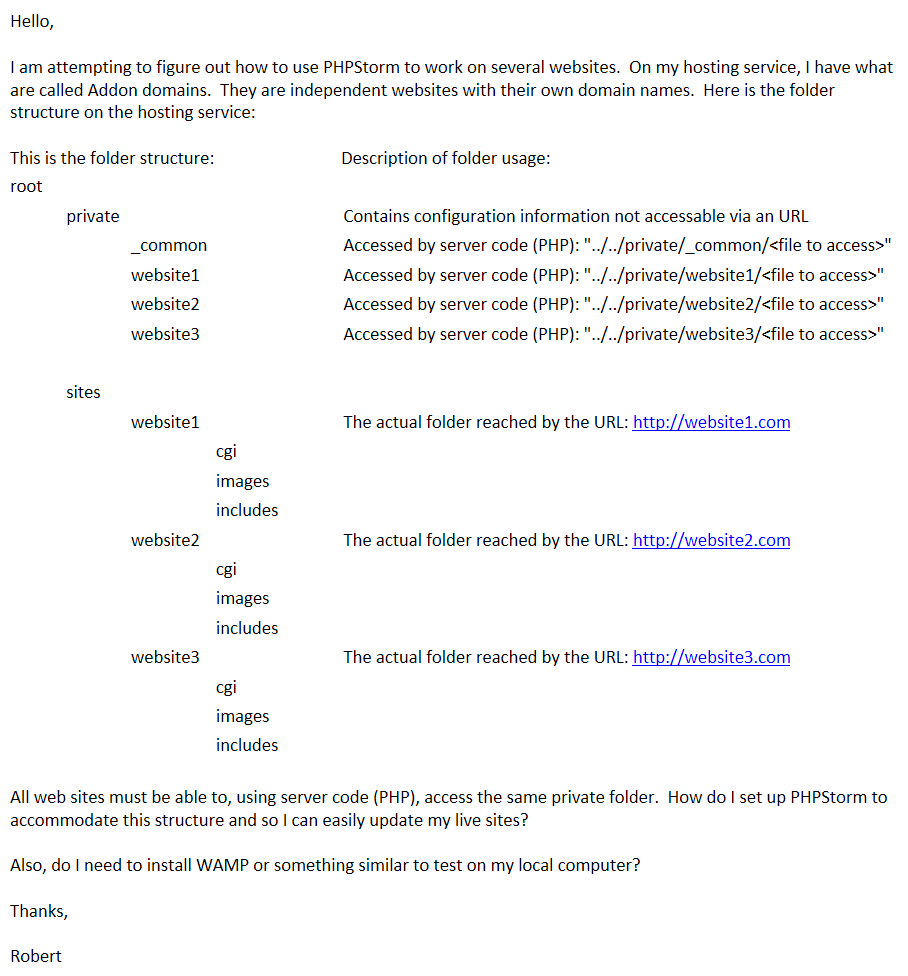
Thanks for your input Michael, however, the main questions is: "How do I set up PHPStorm to accommodate this structure ... ?
I've looked through PHPStorm documentation but I cannot find any clear layout of folders. I've found PSR-0 and PSR-4, but they don't tell me anything in relation to an actual web site. I know that PHPStorm has it own files that keep track of the project that is being worked on, and those files seem to be in the same folder as the root folder for the web site. There is just not much clear documentation on this matter, at least that I can find.
Thanks,
Robert
One of us is confused, I think its you, forgive me if its me.
PSR-0 and PSR-4 are related to where the server looks for include files to execute the website. These don't have any relation to setting up phpstorm at all.
Guess: You have an existing system on a server somewhere that you want to edit. You're going to need to get that down to your local machine in order to work on whatever file you want to work on.
Normally for me there is 1 mapping between local folder structure (the phpstorm project) and the server.
eg: I setup a deployment configuration for mysite.com and then in phpstorm, open the REMOTE HOST panel to see what directory structure exists on the server.
From there if there are folders that I want to work on, I right click the folder and click either "download from here" or "sync with local"
that will synchronize just the files in the folder that im interested in. Here is a screenshot of the sync screen with differences between local and server
* get the latest copy into my local environment (for me via git)
* work on the files, upload to server
You're wanting to have multiple locations to upload to. if you set them up as individual deployment configurations, then you can use the "right click -> upload to" then select which deployment configuration is the destination. Heres a screenshot of a single project which is mapped to multiple deployment configurations.
Hello Michael,
Sorry for the delay in getting back to you.
Thank you for your detailed input. I understand what you are saying, but that was not what I was looking for. However, I have figured out what it was I was looking for.
Again, thanks.