Generating PHPUnit tests


According to various documentation (e.g. https://confluence.jetbrains.com/display/PhpStorm/Creating+PHPUnit+Tests+in+PhpStorm) I should see an item called "PHPUnit Test method" in the Generate popup menu, but I don't. I have PHPStorm 2017.1.4 and I am able to use New->PHPUnit->PHPUnit Test to create a test file, now I want to generate the test methods that I can then fill out with useful tests.
Please sign in to leave a comment.
Hello,
Please try to place the caret at function name, right click > Go to > Test > Create New Test or Cmd+Shift+T > Create New Test.
Thanks but that achieves the same thing as New->PHPUnit->PHPUnit Test, it creates a test file with an empty class but none of the actual test methods
That is weird. What is the configuration in File | Settings | Languages & Frameworks | PHP | PHPUnit?
Please click the download phpunit.phar... link, save the file in the project dir and click the refresh button. Does it still say "Not Installed"?
That's not a download link. The blue underlined text opens a Open File dialog, from which I can select the phpunit.phar file from my computer. I did that and it made no difference, it still says "not installed" and the test classes still don't contain any methods.
> The blue underlined text opens a Open File dialog, from which I can select the phpunit.phar file from my computer.
It actually lets you to pick the location for new phpunit.phar - it is mentioned at the top of the appearing dialog window.
Did you check the permissions? Are they correct?
My version definitely doesn't say what the Open Dialog is for but you're right, when I selected a folder rather than a phpunit.phar file it downloaded a file into that directory and updates the "Path to phpunit.phar" text box (1). I've set the permissions to a+x and it is shown as executable when I look at it in the Finder (2), but alas the settings window still says "PHPUnit version: Not installed" and when I use command-shift-T to generate a new test, the class is empty (3).
Image 1
Image 2
Image 3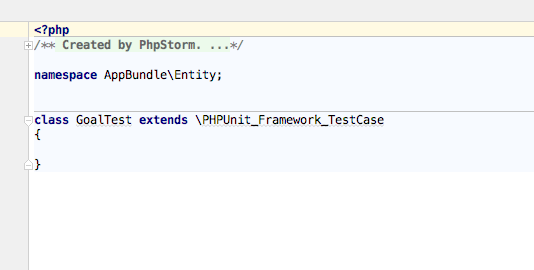
> I should see an item called "PHPUnit Test method" in the Generate popup menu
This menu is available only inside Test Class (as mentioned in a doc).
Ah, I missed that part. I see the end of step two it specifies "inside the test class". It turns out that after all that it doesn't do much anyway, just generates the following code every time
I was hoping for a test named for each function and each one set up to fail, there by forcing me to edit each one until it passed. Not hard to do manually, but also not hard to automate I'd imagine.
It's not for Generate PHPUnit test method, but still it's related: https://youtrack.jetbrains.com/issue/WI-16258