Phpstorm can't run

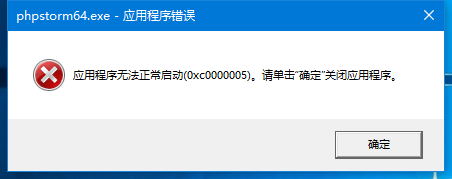
Recently, I updated the Windows 10 1709 version, and then the phpstorm didn't work, hint: application error, application cannot start, 0xc0000005 ,It's no use reinstalling, How can I solve this problem?
Phpstorm detail are: JetBrains PhpStorm 2017.2.4
System detail are:
OS name: Microsoft Windows 10 education
OS version: 10.0.16299 temporary lack of Build 16299
OS manufacturer: Microsoft Corporation
OS configuration: independent workstation
OS member type: Multiprocessor Free
Registered owner: Windows user
Registered organizations:
Product ID: 00328-10000-00001 - AA933
Initial installation date: 2017-10-24, 17:53:53
System startup time: 2017-10-24, 20:28:34
System maker: LENOVO
System model: 80ER
System type: x64-based PC
Processor: a processor is installed.
[01]: Intel64 Family 6 Model 61 Stepping 4 GenuineIntel ~2401 Mhz
BIOS version: LENOVO A8CN50WW(V3.03), 2016-1-13
Windows directory: C:\ Windows
System directory: C:\WINDOWS\system32
Boot Device: \Device\HarddiskVolume1
System area setting: zh-cn; Chinese (China)
Setting of the input method: zh-cn; Chinese (China)
Time zone: (UTC+08:00) Beijing, chongqing, Hong Kong special administrative region, urumqi
Total physical memory: 16,303 MB
Available physical memory: 10,435 MB
Virtual memory: maximum: 19,247 MB
Virtual memory: available: 13,066 MB
Virtual memory: use: 6,181 MB
Page file location: C:\pagefile.sys
Domain: the WORKGROUP
Logon server: \\DESKTOP-HK2FO8D
Patch: two patches are installed.
[01] : KB4049179
[02] : KB4043961
NIC: three NIC are installed.
[01]: Realtek PCIe GBE Family Controller
Connection name: Ethernet
Status: media connection has been interrupted
[02] : TAP - Windows Adapter V9
Connection name: Ethernet 2
Status: media connection has been interrupted
[03]: Intel(R) Dual Band Wireless-AC 3160
Connection name: WLAN
Enable the DHCP:
DHCP server: 10.10.10.173
The IP address
[01] : 172.27.80.171
[02] : fe80: : f10d: eb6:435 c: 3843
Hyper-v requirements: virtual machine monitor mode extension: yes
Virtualization in firmware: no
Secondary address translation: yes
Data execution protection is available: yes
Please sign in to leave a comment.
What does the error message say? For obvious reasons, we can't read it.
Also, please try renaming the %UserProfile%\.PhpStorm2017.2 folder and try to start PhpStorm again.
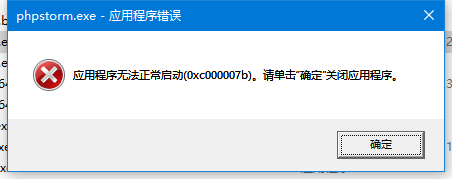
0xc0000005 means "Access violation error" and 0xc00007b means "Application was unable to start correctly".
These errors are coming from Windows directly - they mean that Java cannot start.
Please try to reinstall PhpStorm, also check your system and hardware health - check disk, RAM and system files.
Another user reported that reinstalling/repairing Windows helped him.
I have exactly the same problem. And this seems not rare.
https://stackoverflow.com/questions/20650596/cannot-open-python-error-0xc000007b
https://intellij-support.jetbrains.com/hc/en-us/community/posts/360000000850-erro-0xc000007b0-attempt-to-install-Windows10-64bits
I reinstalled all VC++ packages from 2010 to 2017, and the problem is unsolved. I cannot try resetting the PC as it will break other installed apps. Hope the development team can look into this problem.
Please try workaround mentioned here: https://youtrack.jetbrains.com/issue/IDEA-184029