Altered database window after upgrade to 2017.3

I have upgraded to Phpstorm 2017.3 today. After this upgrade I noticed that my database window has changed and I would like to know how to get it back to the previous layout.
1. To add a schema from a source I no longer see a blank line at the top of the selected schemas. This used to give me a dropdown list to select the databases I needed under a specific data source. Instead I now have to edit the data source and then select the schemas in that popup window. This is annoying and I would like to have my old view back.
2. In the database window I now not only see my schemas in de data source, I now see ALL files in the data source. This included files like ascii_bin, gb2312_chinese_ci etcetera. I never saw those until the upgrade and I don't want to see them right now as they very much clutter up the window.
Can anyone please tell me how to restore the settings of my database window back to how they were before the upgrade?
Kind regards,
Rob.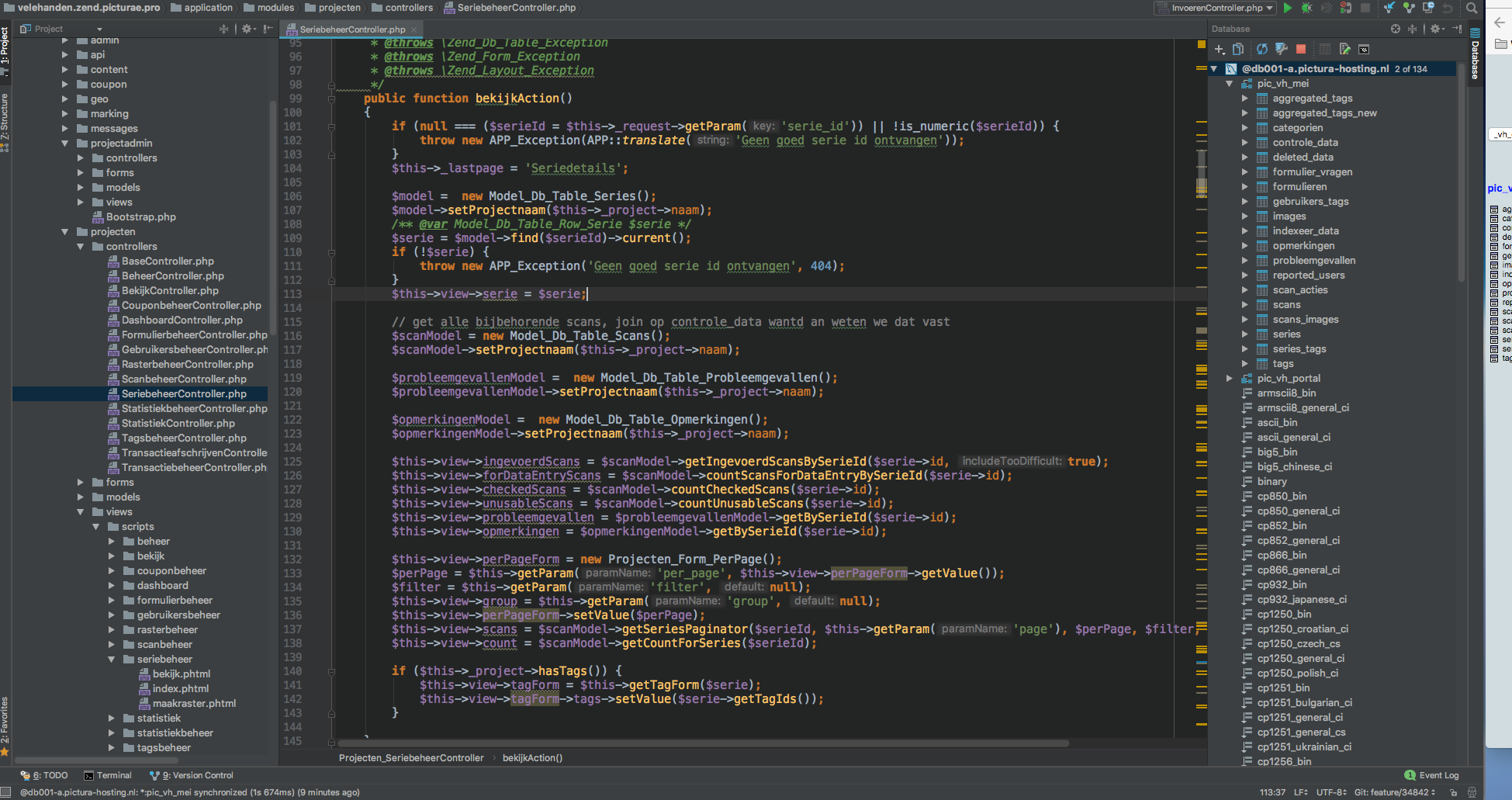
Please sign in to leave a comment.
Hi there,
1) Click on "2 of 134" next to the DataSource name
2) Those are collations -- you can place them under a separate node -- just choose "Group Schema" in Database panel options (e.g. right click on tool window title or via cog/gear icon)
Hello Andriy,
That all worked perfectly. Thanks!
Rob.