Setup Clion on Mac after removing Xcode

So far with helps from friends, I have managed to compile source codes written in C++ and test basic stuffs using the IDE.
Following is what is in my CMakeLists.txt every time I create a new project using C++ Executables.
cmake_minimum_required(VERSION 3.8)
project(untitled)

set(CMAKE_CXX_STANDARD 11)

set(SOURCE_FILES main.cpp)
add_executable(untitled ${SOURCE_FILES})
So the issue I have is with the project I used to work on before I removed Xcode manually.
As seen, I still have Command Line Tools.

So when I created a new project, I experienced no issue in compiling what I wanted. And the auto-generated CMakeLists.txt file contained the same content as with any previous project.
Below is the specific error message I received, and which I want to ask your advise on:
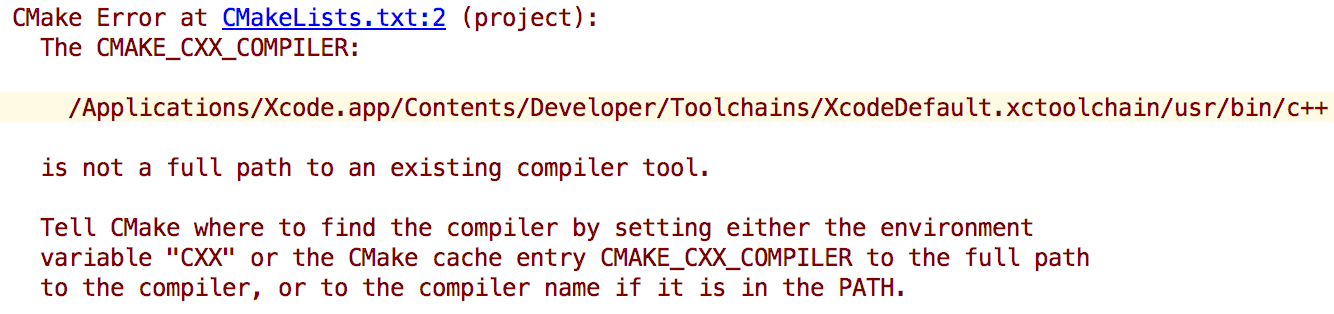
I really want to understand the issues and troubleshoot on my own in the future.
Any input will be appreciated. Thanks in advance!
Please sign in to leave a comment.
Hi! CMake can't find the compilers. Please go to File | Settings | Build, Execution, Deployment | Toolchains and specify the appropriate paths to the C and C++ compilers on your machine. Reload the CMake project after that (Tools | CMake | Reset Cache and Reload Project). Does it help?
Hi! Thanks so much for the reply.
I did find Build Execution Deployment under Default Settings but I dont have Toolchains option. only saw python debugger/python interpreter/deployment/console.
Is this a matter of version..?
But i just followed second direction of yours and it works!
Awesome. Thank you so much.
Jac0786ky, Toolchains option is not under File | Default Settings | Build, Execution, Deployment, but under File | Settings | Build, Execution, Deployment which in case of macOS means Preferences | Build, Execution, Deployment. Sorry for the misleading answer. Anyway, I'm glad it helped!