PSI independent quick fix action

I want to create an action similar to a quick fix action, it should only display under the red bulb drop down, like this:
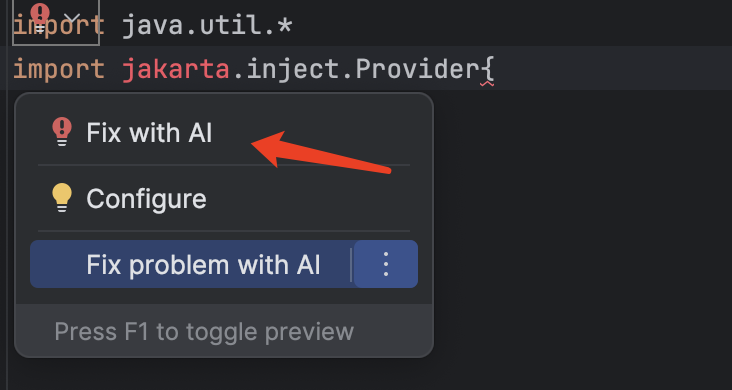
but it should not depends on PSI inspection, i.e., it should be displayed whenever there're errors in the current position.
It should not rely on the language specific PSI, as it's intended to work for all IDEs and it's fixes is fetched remotely, not via PSI manipulation.
When user click the `Fix with AI` menu, I'm expecting to get the detailed error description and TextRange for the error.
The current issue with LocalQuickFix is, it relies on PSI inspection and the generic API only report syntax errors, but I want it to be displayed whenever there're errors in the current position:
    override fun buildVisitor(holder: ProblemsHolder, isOnTheFly: Boolean): PsiElementVisitor {
        return object : PsiElementVisitor() {
            override fun visitErrorElement(element: PsiErrorElement) { // only captures syntax errors
                holder.registerProblem(
                    element,
                    element.errorDescription,
                    ProblemHighlightType.GENERIC_ERROR_OR_WARNING,
                    AILocalQuickFix()
                )
            }
        }
    }
I'm also OK if we can achieve this through IntentionAction. The problem with IntentionAction is I need to decide when this entry is available, and it should only be available when the current cursor position has errors. But I haven't find there's a lightweight way to achieve this.
    override fun isAvailable(project: Project, editor: Editor?, file: PsiFile?): Boolean {
        // true only at the position where has errors
    }
Please sign in to leave a comment.