Can't create new Objective-C class

I can't create new Objective-C class in my AppCode 3.1.
This is how I create a new class:
It shows mesage like this:
Velocity Error
Error pasing file template: Unable to find resource 'Objective-C File Header.m'
My XCode version is 6.1.1
My MacOSX is 10.10.1
Anyone help?
Please sign in to leave a comment.
If you select "Edit File Templates..." from the context menu (see screen below), what do you see in the file template list?
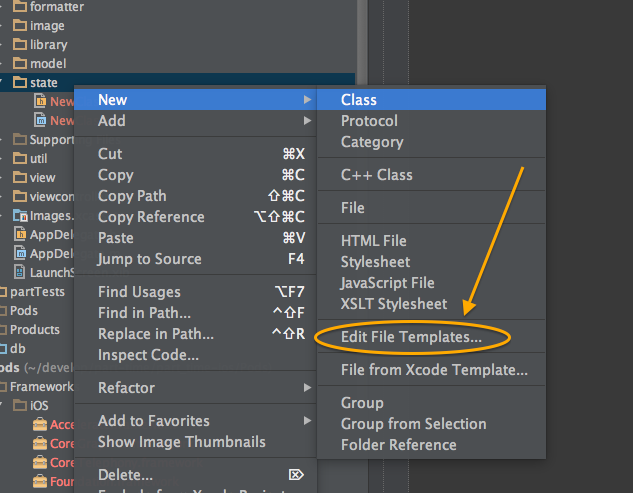
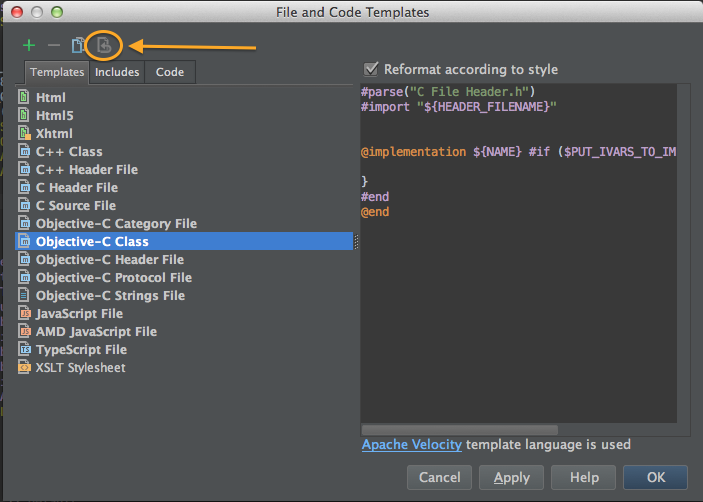
Here's what I see. If you have a corrupted or modified (or empty) version of the Objective-C class file template, you can try hitting the revert button (circled below).
If that isn't possible or doesn't fix the issue, then you might want to try redownloading / reinstalling AppCode, since those templates are packaged in with the app bundle AFAIK.
Thanks Daniel, It works!!
I found that I edited my templates in previous version of AppCode, when I revert it to default state everything is ok!
Daniel,
Thanks for the reply, that solved the same problem I just had.
For what it's worth, it appears my templates were edited by changing the style preferences in AppCode. I'm not sure if this consistently leads to a bug during refactoring.
Jason