AppCode shows two of each simulator, Fails to build on all

AppCode 2.5.5 Xcode 6.1
Brand new Yosemite install
Brand new XCode install
Brand new AppCode install.
Open existing project - runs fine from Xcode
In Appcode I see two of every simulator in the drop down (see below)
doesn't matter which I pick, I always get build errors...
xcodebuild: error: Unable to find a destination matching the provided destination specifier:
{ OS:8.1, name:iPhone Retina (4-inch) }
Unsupported device specifier option.
The device “My Mac” does not support the following options: OS
Please supply only supported device specifier options.
Available destinations for the "PooperPig iOS" scheme:
{ platform:iOS Simulator, id:F7F432D7-8110-4CC3-B716-942E71E550DE, OS:8.1, name:iPad 2 }
{ platform:iOS Simulator, id:26E6136A-2B39-4F4C-9282-3E99EBB16293, OS:8.1, name:iPad Air }
and so on for each simulator.
I have no idea what to try (I have deleted & reinstalled already)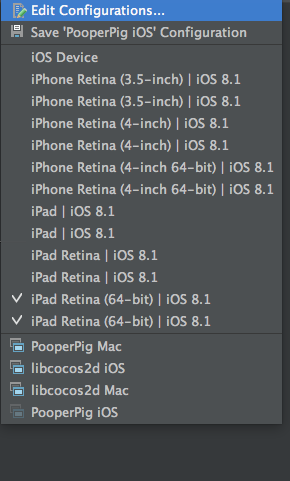
Please sign in to leave a comment.
Max, AppCode 2.5 doesn't support new Xcode versions; please update to 3.0, or wait until 3.1 EAP opens in a few days.