error 65, works in Xcode

Background:
I dabbled in Obj-C two years ago and mean to get back to it this summer. Just finished teaching a course in software development and for the course project, one of my student asked if he could develop it for his iphone (he seems to do a lot of development in iOS) instead of Java; I said okay. I get his project and tested it in xcode, ran correctly. In the meantime, I was searching for comments on xcode and discovered AppCode. I got the trial version and tried running his app on it.
When performing run, I get the following errors:
-----
2013-05-07 09:54:46.758 xcodebuild[5192:707] WARNING: skipping plug-in at path '/Users/xxxxxx/Library/Application Support/Developer/Shared/Xcode/Plug-ins/XcodeAutoAssistant.pbplugin' because it is not compatible with this version of Xcode.
Code Sign error: The identity 'iPhone Developer' doesn't match any valid, non-expired certificate/private key pair in your keychains
The following build commands failed:
Check dependencies
Build Finished with Error: 65
-----
I have the latest xcode installed, no additional apps except AppCode. I don't understand why something is not compatible with "this version of Xcode" - is the problem with AppCode? Any input would be appreciated. I searched for error 65, but turned up a lot of posts here that seem generic or relate to many different types of problems.
Thanks.
Please sign in to leave a comment.
Pierre,
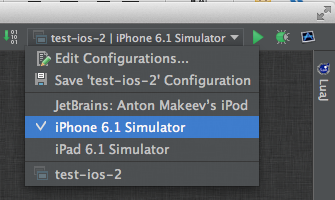
try selecting a iOS Simulator from the run configurations list at the top-right corned of the window - it seems that you don't have a correct iOS profile installed to build apps for the device:
Regards,
Anton Makeev
Thanks, that worked. Now to crack open the Xcode book and do more learning!