Connection error while adding new remote interpreter

Hello, i install `vagrant` with Ubuntu-Server-14.04 and install rvm and ruby 2.1.2 on it. After i create new project in RubyMine and go to `Settings`->`Ruby SDK and Gems` click on `plus` in first box and click on the `Fill from vagrnat config` and select `vagrant` init folder. Then i click `Test connection` and get this error 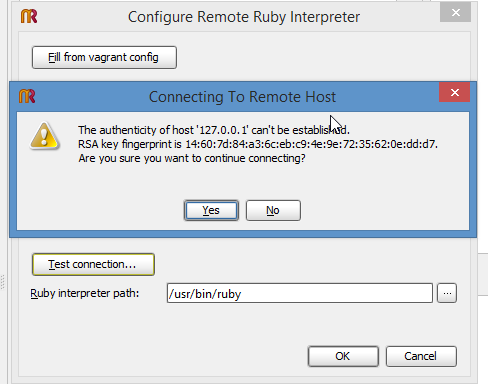
How i can resolve this problem? Thanks.
Please sign in to leave a comment.
If i click `Yes` i get alert message `Successful connected to 127.0.0.1`, but if i click on `...` (select ruby interpreter path) i get again the same alert message, but if i click `Yes` i get alert `Connection to 127.0.0.1 failed. \n Connection failed`. If i click to `OK` button, a window opens with connection where are loading something indefinitely (i waiting more than 10 minutes)
Hi,
it is supposed that answering "yes" would allow you to resolve the problem.
And since it is not then it looks like a bug for me, please report one in our tracker (please also attache RubyMine's logs)
One more note RubyMine doesn't support remote rvm sdk yet :( It will in next version but for now you can either install ruby manually
or use rbenv for this (but use real ruby sdk which are under "versions" directory)
Regards, Oleg.