Developing gem files don't show up in file search

I'm using RubyMine to develop an internal gem. When I open file search box (ctrl+shift+n, command+shift+n), my source files doesn't show up for choose. Only specs files show up.
Also when I'm on a spec file, the short key to go to the matching source file doesn't work, but it works the other way around (From source file to spec file).
I notice that the top-level directory of this source file is marked as (library home), not sure it's related.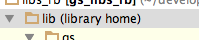
Any idea how to fix this?
Please sign in to leave a comment.
If the gem source is marked as library root then the files under it are not treated as source.
What project structure do you have?
Oleg.
Thanks for the quick response.
I think it's quite standard gem project structure. Assuming that the gem's name is aa
aa/
Also sometimes I use this gem directly in the rails projects by modifying my rails projects Gemfile.
From:
gem 'aa', git: 'private-gem-repo.git'
To:
gem 'aa', path: '../path-to-aa/'
Not sure this caused the issue.
Is there a manual way to unmark that?
Hi,
if you will find a way to reproduce the problem please conside filing a bug.
To change settings you can try to go to Settings|Project Structure
Hope this helps, Oleg.