How to Customize 'Surround With' ?

I can't figure out how to customize "Surround With"
I couldn't find a way to to customize the set of options associated with "Code / Surround with (Ctrl-Alt-T)"
Then I looked at "Surround with Live Template". I see how you can edit & create live templates to work like snippets - but how exactly would you create a live template that gives the 'Surround With' behaviour. I'm guessing that there must be a live template variable that you use, but I'm not sure what it is...
Thanks! Andy
Please sign in to leave a comment.
Hi Andy,
Please add new Live Template in File | Settings | Live Templates | Live Templates. Use $SELECTION$ makros to define selection in your code.
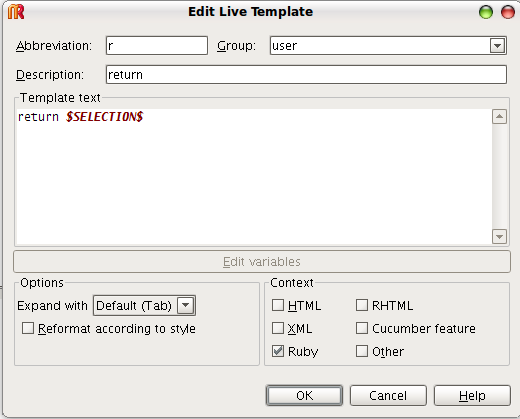
For example let's create live template
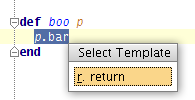
Select some text inside editor, press Ctrl+Alt+J
And voila!
Regards,
Oleg