How to setup code style for only one project?

Usually I use 2 spaces indent for all files. But for some project I must use tab character instead.
I've found .idea/projectCodeStyle.xml in project directory. It looks like what I want. I've replaced all <option name="USE_TAB_CHARACTER" value="false" /> to <option name="USE_TAB_CHARACTER" value="true" />, restart RubyMine, and nothing changed.
What I'm doing wrong?
I use RubyMine 2.0 beta 2 build 1480 on Mac OS X.
Attachment(s):
projectCodeStyle.xml
Please sign in to leave a comment.
Hi,
Please use File | Settings | Code Style | General | Ruby Tab instead of editing config files.
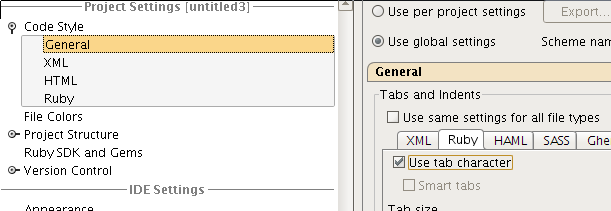
Hope this help,
Oleg
Thank for response, Oleg.
I knew about File | Settings | Code Style ... . Actually, I'm looking for setup only one project, not all. I found "Use per project settings". It's exactly what I needed. Do not know how I missed it before, now it looks so obvious.