Customizing the IDEA Settings Dialog

Hi Team,
I implemented "Configurable" class as described in https://confluence.jetbrains.com/display/IDEADEV/Customizing+the+IDEA+Settings+Dialog page. In setting dialog my nodes displays like this;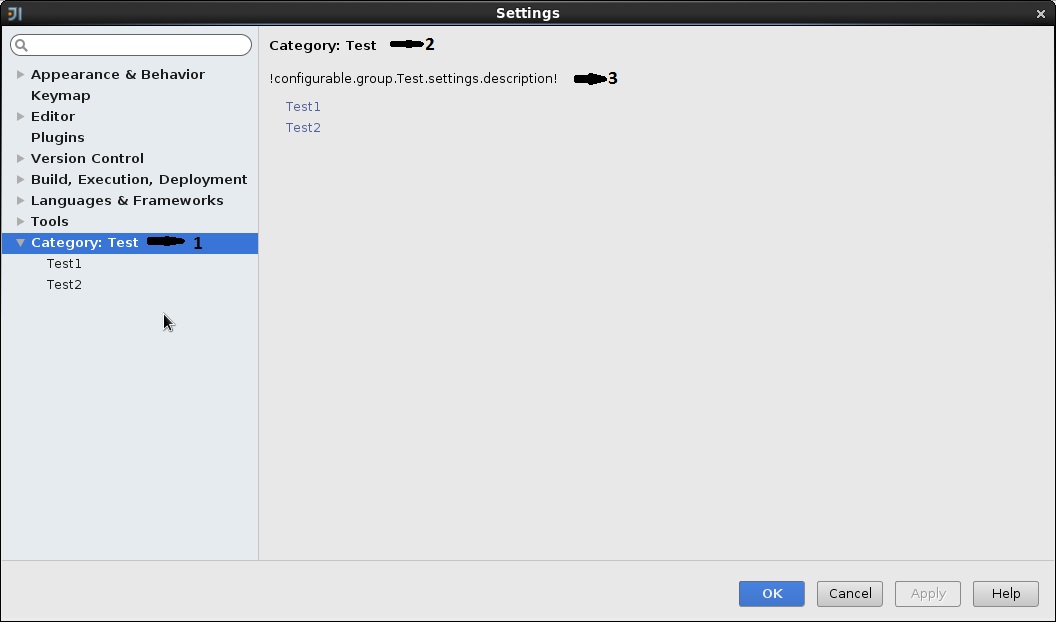
My "plugin.xml" configurations
<extensions defaultExtensionNs="com.intellij">
<applicationConfigurable groupId="Test" displayName="Test1" id="test1" instance="com.test.Test1Setting" />
<applicationConfigurable groupId="Test" displayName="Test2" id="test2" instance="com.test.Test2Setting"/>
</extensions>
How should I resolve issues marked on the image;
- How to remove "Category" in both number 1 and 2
- Reason for the number 3 issue and how can I resolve it.
Thanks,
Navin
Please sign in to leave a comment.
You can't define your own top-level groups at this time. You need to specify one of the existing group names, as described in the javadoc for the ConfigurableEP class, or leave out the groupId entirely.
For my plugin I need to define top level group. Is there anyway that I can achieve that capability?
Test
>Test1
>Test2
Why do you think you need to define a top-level group? What kind of settings do you want to provide?
I want to provide some plugin specific settings and configurations. I've done same thing in Eclipse and Im trying to do same thing here in IntelliJ as well, thats why.
Why does it have to be a top-level group, and not nested under one of the existing top-level groups (or "Other settings", which is where it will be placed if you do not specify a group ID when you register the configurable)?
In Eclipse plugin I created as top level group thats why. I'm trying to integrate same behaviour in IntelliJ. If its not possible is there any way I can reolve issue 3 marked on the image?
If you create your own configurable which is not top-level (and, if needed, use the Configurable.Parent interface to create a group of configurables under your node), you'll have full control over the contents displayed in your configurable, and none of the issues on your screenshot will arise.