Flash App Icon Errors & Problems Copying Image Files to apk / ipa Files.

Hello.
I am making a Flash AIR application in IntelliJ IDEA. I am currently trying to test for android, and I am creating the apk file by choosing Build -> Package AIR Application... and then clicking Package. I get this error when I do it:
Failed to package AIR application HeadExploder.apk:
MY_PATH\HeadExploder-app.xml: error 303: Icon media/icons/exploindeIcon50.png is missing from package
The icons section of my HeadExploder-app.xml descriptor file looks like this:
<icon>
    <image50x50>./media/icons/exploindeIcon50.png</image50x50>
</icon>
I've tried various things in the value here like:
./media/icons/exploindeIcon50.png../media/icons/exploindeIcon50.pngmedia/icons/exploindeIcon50.pngsrc/media/icons/exploindeIcon50.png./src/media/icons/exploindeIcon50.png
But nothing I try works. :/
My src folder is at the same package level as the descriptor xml
It goes src/media/icons/ ..icon files..
The build output when I "Make" the project is in
out/production/HeadExploderIntelliJ
folder and contains the images I need in the icons folder.
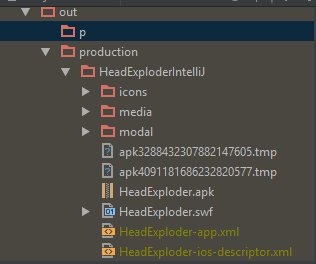
However, when I use 7-zip to "open archive" on the
apk it does not contain the icons folder:
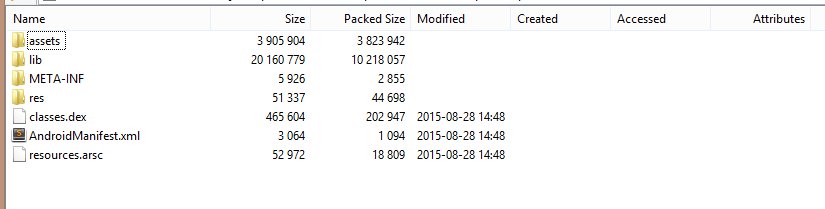
So my questions are:
- Is my problem actual that the icons folder is missing in the apk?
- If yes, how can I copy the image files folder to the apk?
- If no, how to I add the icon images and prevent the error?
I know other people have gotten past this by using the command
line ADT to creat the apk. I feel like there must be a way to
do it in IntelliJ though so I am asking for help. Thanks.
Please sign in to leave a comment.
Files to include in the APK package are configured in the Project Structure | Modules | [your Flash module] | [your Flash build configuration subnode] | Android tab.
Thanks. It works.
In the Android tabs under "Files and Folders to Package" I added this:
C:\\MY_PATH\icons with "It's relative path in package" as "icons"
Then reference the icon image like this:
Yep, this looks correct.