Dart Plugin - Cannot Import a Dart Module from a folder!

The Dart plug-in for IntelliJ IDEA is unable to import a Dart Module in my Dart project from a folder.
If I select "Import Module.." from the File Menu, it doesn't show the *.yaml extension of a Dart module in the list of available files formats.
If I try to import any Dart Module from a folder, after selecting the .yaml file I get the following error: Cannot Import anything from /Users/.../.../pubspec.yaml
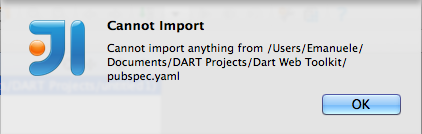
It is also impossible to import a Dart Project using the "Import Project..." option of the "File Menu", and selecting the Dart Project file (usually named: "pubspec.yaml").
The only way to load a Dart Module or a Dart Project from a disc folder is to create a new Dart project in IntelliJ IDE, edit the pubspec.yaml file and manually add a package source with the "path:" option.
For example, to add the module "Dart Web Toolkit" you need to edit the yaml file in this way:
name: untitled1
dependencies:
browser: any
dart_web_toolkit:
path: /Users/Emanuele/Documents/DART Projects/Dart Web Toolkit
And then you need to select the "Dart Get Dependencies" option from the contextual menu to import it.
Also this method does not add a new module or a new project, but only add the module as a "dependency".
There is no way to directly import a Dart module and automatically create a new Dart Project with it.
Note that this is also true if the module or the project is not a local folder but it is hosted on a Git repository. There is no way to add a Dart module or a Dart project, you need to create a new project, and manually edit the yaml file adding the url to the dependencies section, like this:
name: untitled1
dependencies:
browser: any
dart_web_toolkit:
git:
url: git://github.com/akserg/dart_web_toolkit
ref: master
Proposed Solution:
- Allow to import a Dart Module or a Dart Project from a folder, supporting the *.yaml file format in the "Import Module" or in the "Import Project" options of the File Menu
- Allow to import a Dart Module or a Dart Project from a Git repository url, adding a "Import Module from Git" and a "Import Project from Git" option in the File Menu
- Allow to add a Dart Module to an existing Dart project as a dependency selecting the correspondent *.yaml file from a folder or the Git repository url.
Thank you.
Please sign in to leave a comment.
Hi,
in IntelliJ IDEA terms you don't need to 'import' Dart module, you need to configure an IntelliJ IDEA project/module for existing sources. To do this:
I agree that it would be more convenient to click Import and select pubspec.yaml file or its parent folder and let IntelliJ IDEA do all the stuff automatically. Will handle it in scope of the issue that you submitted: http://youtrack.jetbrains.com/issue/WEB-10211
Note that integration with Git and other version control systems already allows you to checkout and configure the project. Start with Checkout from Version Control at the Welcome screen or VCS | Checkout from Version Control.
Thank you Alexander, but even following your instructions I was not able to import correctly a Dart project.
I followed this instructions for a simple project residing on a disc folder :
But the project is imported without creating any configuration:
If I try to edit a new configuration, clicking on "Edit Configuration...", no default configuration option for "Dart Web Application" is found:
Solution:
- The Dart PlugIn must add a new Configuration called "Dart Web Application"
- When creating or importing an existing Dart Project, it should automatically use the project informations in the *.yaml file, like the "entry_points:" parameter, to create the correct launch configuration for Dart (i.e. launching Dartium and not Chrome browser).
- If more entry points are specified in the project *.yaml file "entry_points:" parameter, it should automatically create additionals launch configurations for each one.
Thank you.
To create a run configuration right click html file and select 'Create xxx.html' or 'Debug xxx.html'. Dart web apps are launched using run configurations of type 'JavaScript debug' that will be created. I agree, not ideal wording. By default it will be launched in Dartium.