JSF Pages are not refreashed

I just started using IntelliJ this week and I am loving it! Great human-IDE!!!
I have a tomcat maven project with Spring,JSF 2.0 and ICEFaces and all is built and deployed (exploded) well.
The only problem is that any time a make a change in my jsf page and clicking on the play button ; a simple update resources and classes has not effect. I cant see the modified content on my Safari
I also deleted the tomcat work content or deleting the safari cache did not help! I think that tomcat is not deploying the jsf pages.
I even tired the things done in this vid : http://youtu.be/93kFzr-Kw3k but no hope!!
Am I missing something???
Happy for any quick feedback
Stefan
Please sign in to leave a comment.
Hi saabir.
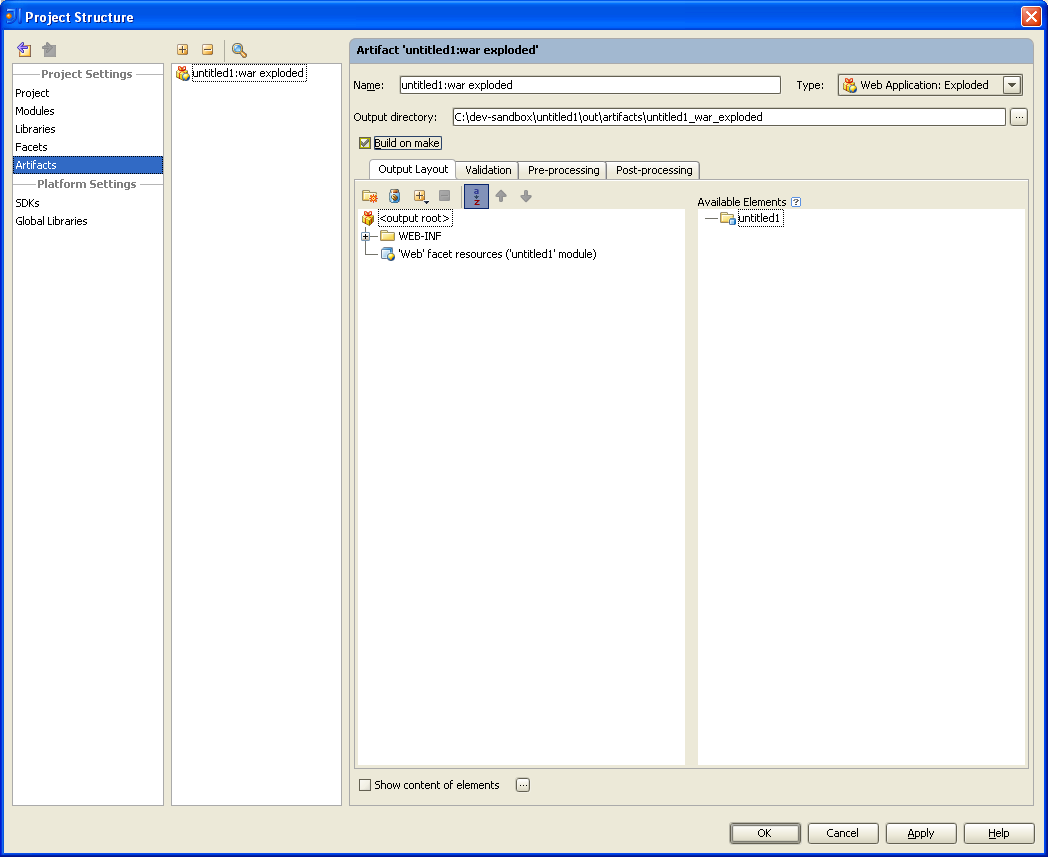
The most convenient way to deploy file to a running instanc is the Ctrl+Shift+P shortcut directly from the editor. Make sure you have a war:exploded artifact. Play button will work, if you checked "make before run" on the run configuration page and "build on make" on the artifact configuration page.
regards, Alex
Hello Alex
Thanks a lot for your prompt feedback.
I tired the key options but since I am working with a mac, I guess the key combination are not the say with non-macs computers.
Do you happen to have a print screen of the two dialogs you mentioned?
My war is an exploded artifact.
Check this 1min 20s screenCast I created to show you : http://www.screenr.com/UNUs
thanks
Stefan
i see at the second 35 you checked required buttons on the run config page. artifcats page could be found at File>Project Structure>Artifacts (see screen). make sure updated files appear in the output directory
 package file shortcut could be found at Help>Default keymap reference > Compile selected file, package or module
Hi Alexander
Thanks a lot :) ! Its working!
regards
Stefan