QUESTION: WebStorm Document Read/Write State (When does WebStorm change the read/write state to read only?)

I started to edited an HTML page, and go this dialog:
Under what circumstances does WebStorm change the read/write state to read only?
QUESTION:
- Why did I get "Clear Read-Only Status"?
- What did I do that made the document "read only"?
- Did I do something that made WebStorm make the document "read only"?
Please sign in to leave a comment.
Hi there,
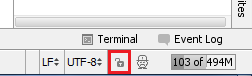
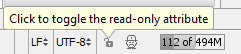
Extremely likely that it's either was read-only already .. or you made it read-only yourself from within an IDE -- it's rather easy to do so (e.g. with my layout it can be simple misclick when trying to bring Terminal)
Because file has "Read Only" status and IDE prevents you from saving into such file. Imagine that you have couple of similar files and do not want certain files to be modified at all.
Not a Mac user so don't know how exactly it's done there .. but on Windows it would be via ReadOnly file attribute.
Thanks for posting the picture of the lock icon.
As you pointed out, I probably clicked it without realizing what I did.
I really appreciate your help.