Edit files remotely

I have a website on a remote server.
I would like to edit the files on the remote server directly with Php Storm.
Is it possible ?
Because with the "Remote Host" tool I can only view the remote files.
Thanks
Please sign in to leave a comment.
Hi there,
Direct editing over FTP/SFTP/etc is not supported -- you have to download file first.
Just right click on remote file and choose "Edit" -- it will download and open it locally. Once done -- upload it back (or configure automatic uploading on Save).
https://confluence.jetbrains.com/display/PhpStorm/Deployments+in+PhpStorm
Hi,
I have tried "right click then edit" but the file is not opened locally (nothing happens).
Do I have to check something ?
Thanks
How does your context menu looks like?
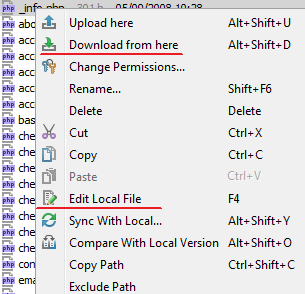

In v8 you basically have to chose "Download from here" and only then "Edit Local File"
If you do not have "Download from here" command ... then it means that remote path is not mapped to local .. and IDE does not know where to download/store such files. In such case you have to check your mappings in your Deployment settings.
In most recent v9 EAP build (released yesterday) you now can edit file directly over (S)FTP (even if path mappings are not properly setup):
Check more here: http://blog.jetbrains.com/phpstorm/2015/04/phpstorm-9-eap-141-891/
Hi,
thanks a lot for the new feature.
I use now "Edit remote file" and it is working file.
Is there a way to upload automatically changes on a files without having to confirm the upload ?
Thanks
Remote file editing is still work in progress (was introduced in latest build only).
Everything that is currently available is described here: http://blog.jetbrains.com/phpstorm/2015/04/remote-edit-in-phpstorm-9-eap/