Changing default location for debugging in WebStorm

I'm having difficulty to configure my project. My project is name web and is also the main folder, my index.html is in that folder. But when I use the debugging tools I'm forced to go to http://localhost:port/web/index.html or I get a 404.
My problem is that it can't be in a subfolder, it needs to be in http://localhost:port/index.html or it won't work.
So the web folder is there but I don't want to have it affect my link. If I add the web folder in the URL it goes to right page, but my project won't work if the URL is changed.
My question: Is there any way to change the path to my project so I can access my index.html without adding the /web/ in my URL?
NOTE: I can't change my project to adapt to the new path.
Please sign in to leave a comment.
Hi there,
What do you mean by "localhost:port" ? Is it "localhost:63342" ?
If so:
Edit your
file (or local DNS server, if preferred and have one) and point ProjectName to your computer's IP.Create Deployment entry of correct type (
should do), configure it (provide desired URL etc -- ) and mark it as Default for this project -- now IDE will use URL from here when generating "open in browser" URLs.So I want my website to use the format http://ProjectName:port/index.html

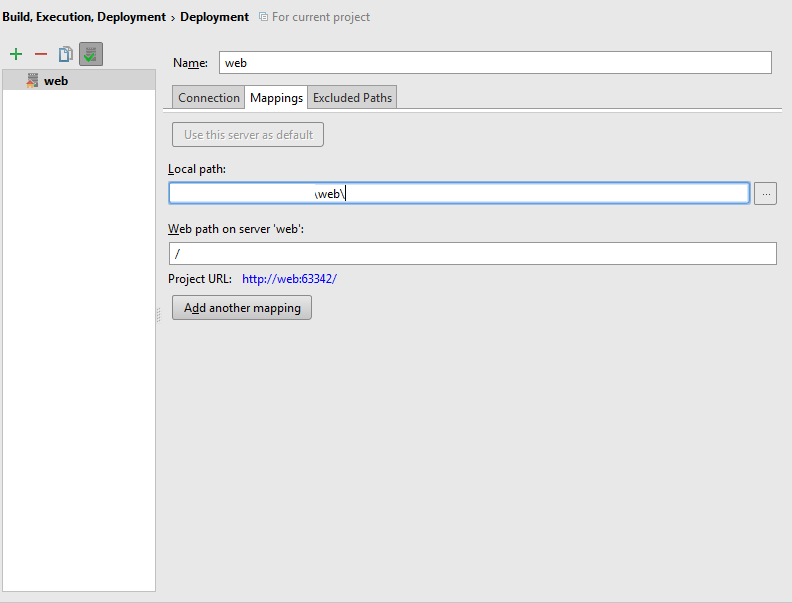
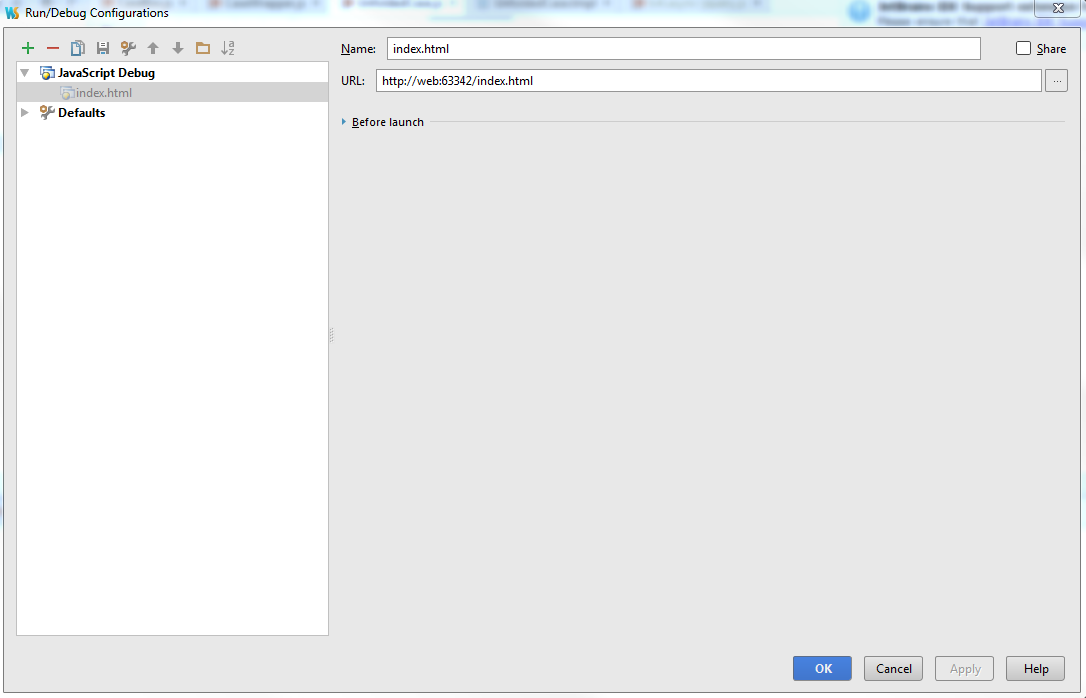
The thing is that I did everything like you said, but it still doesn't work. When I use debug it opens an empty tab in chrome.
My projectname is : web
In my host file I have: 127.0.0.1 web
Deployment settings:
Debug settings:
Working fine here. Must be something else...
What do you have when you execute "ping web" in console?
If I use 127.0.0.1 it works; if I use "proper" IP (192.168.0.2) then it does not (works now after restarting IDE).
What you may also try (just to see if it will make any difference):
1) Enable "Can accept external connections" at "Settings | Build, Execution, Deployment | Debugger"
2) Restart IDE
3) You may see "Built-in HTTP server on custom port 63342 disabled" message .. but it still works OK.
There is no need to enable "Can accept external connections" if IP = 127.0.0.1 (localhost) .. it's just for testing purpose (if this will make any difference)
Double check using netstat or any GUI-based tool that PhpStorm listens on that port and that it is not blocked in your Firewall.
For me these 2 URLs provide the same result:
https://confluence.jetbrains.com/display/PhpStorm/Using+the+Built-in+Webserver+in+PhpStorm
Unfortunately this manual is very brief and has no mention of "projectName:63342" option for some reason, despite the fact that this possibility gets mentioned by devs every time, e.g.
http://blog.jetbrains.com/webstorm/2013/03/built-in-server-in-webstorm-6/ --> http://blog.jetbrains.com/webstorm/2013/03/built-in-server-in-webstorm-6/#comment-355
So I tried everything, the thing is that I can do a ping to web without problem and I see web:63342 in my netstat.
I can still access the website using http://web:63342/web/index.html by adding /web/ in the url, but I still can't access it using http://web:63342/index.html which is the page that is loaded when I click the debuggin button.
Using the Can accept external connections the page loaded to http://web:63342/index.html, but like I said not the right url.
It's weird, because the debugger launch the write page, but the file are link to the wrong url, so I can't load my page.
Also thank you for helping.
I'm confused here.
I don't think I can be helfull here any more without seeing/trying some sample code myself...
P.S.
Maybe you have more than one project called "web".. so IDE serves the wrong file?
Here I meant that unless I changed the url, it didn't load anything... I had to add the /web/ so that it would load something, but still I couldn't load everything because of my code.
I checked and it's my only project name web.
I'm totally lost, I tried everything and it should work, but it doesn't. I even tried another port.
Still thank you for your help.
Suggestion then: please create brand new empty project, give it a unique name and try it there on one simple HTMl file.
i.e.
For the little bit i understand ... when i create a fake domain using apache virtual host and change the windows host file content , the mail ( php Mail API ) in my windows OS local server ( php dynamic content redirection CMS) don't work it is the mess !!!
Change setting in OS , application level don't have to create new problem !!! and I dont want to waste my time to install Sendmail or SMTP on my Windows OS (most free smtp server are on linux ) .
I l lalways find cubersome the way phpstorm use/ configure it own local http server and server location and mapping access !!
As always issue is because we don't understand things ( the "logical" way phpstrom has implemented its own gui to configure it own IDE )
Main documentation of phpstrom is base on static php file and not CMS where redirection is handle in the server side !!
i hope i write wrong things but noto easy to configure it ( i already succeed but not in all case )
regard's