PHP HTML syntax highlighting

Goodday!
i was just wondering if i can fix this annoying 'feature' of syntax highlighting:
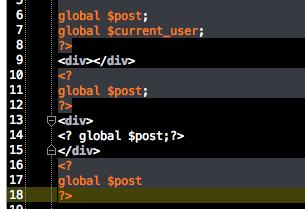
on the screenshot you see a small example.
i have noticed that when PHP and HTML is combined it sometimes looses the PHP syntax highlighting
i found out why:
when you insert HTML and open an DIV and close it
the next PHP will have its correct colors
(line 11)
But when you have a DIV open
and add some PHP to it
it looses it colors
(line 14)
after i close the DIV
the PHP gets its colors back
(line 17)
Is this possible to fix? and have PHP always on syntax highlight?
Thanks!
Attachment(s):
Schermafbeelding 2014-09-24 om 11.03.13.png
Please sign in to leave a comment.
Hi there,
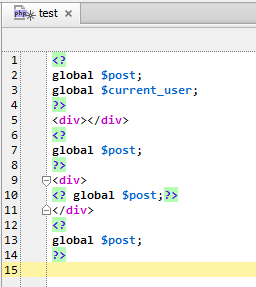
1) It would be fantastic if you could provide version of IDE that you use
2) Is it always reproducible in THAT example? If so -- could you attach such file here (not copy-paste .. but actual file)
3) Have you tried using full tag <?php instead of just <?
It seems to work OK here right now (Windows 7 x64; PhpStorm v8.0.1)
thanks for the reply
i added the file to this reply
i am using OSX yosemite, with phpstorm 8.0.1
Can it be the 'theme' colors' maybe?
Attachment(s):
test.php.zip
Color scheme -- unlikely (it may hide some details .. but not be reason for this).
Please show a screenshot of the popup menu when you do Alt+Enter (or whatever you may have there on Mac for Quick Fix menu) while having caret inside of such not-working div tag.
Please also temporarily switch to Default or Darcula color scheme (either "Preferences | Colors & Fonts" or just "View | Quick Switch Scheme... | Switch Color Scheme") -- I'm expecting to see some special background color there in not-working place (should be light green in Default).
oke, changed the theme style

and place the carret at line 12, alt-enter
You have somehow injected HTML into all <div> tags -- this forces to use HTML syntax in everything between them.
"Preferences | Language Injections" -- find and delete offending rule (should be an entry of "global" or "project" type). You may disable it first before deleting (to be on a safe side; in case you are not sure about which one).
Alternatively -- just use "Un-inject Language/Reference" entry from Alt+Enter popup menu (AFAIK this only disables that rule; you still may need to remove it from the Preferences screen)
P.S.
Yes, disabling only will be enough .. but I see no reason at all why to keep such completely wrong rule.
yes!

i found a 'global rule' in the language injections.
i disabled it and this fixed it.
Many many thanks mate!!