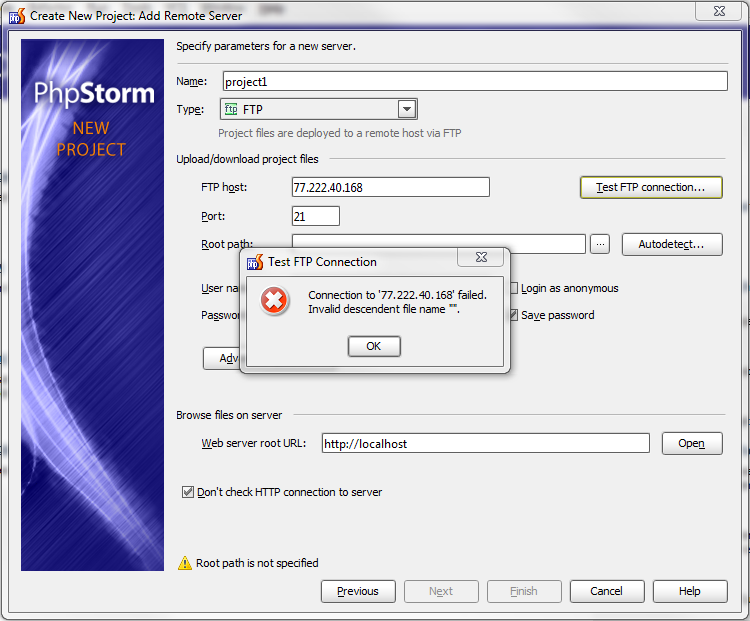
Looks like site is reporting a file with empty name, and it breaks parser. Please collect log and attach it here or create an issue in YouTrack and attach log there (there are more options, for exapmle, to make log visible only for developers).
Elena, thank you for instructions. Here are logs of my ftp connection:
2012-08-06 17:18:45,813 [ 326977]  DEBUG - t.connections.RemoteConnection - Opening connection to ftp://77.222.40.168:21/
2012-08-06 17:18:45,844 [ 327008]  DEBUG - ains.plugins.webDeployment.ftp - 220 Welcome to kansas.sweb.ru.
2012-08-06 17:18:45,844 [ 327008]  DEBUG - ains.plugins.webDeployment.ftp - > USER photorooru
2012-08-06 17:18:45,859 [ 327023]  DEBUG - ains.plugins.webDeployment.ftp - 331 Please specify the password.
2012-08-06 17:18:45,859 [ 327023]  DEBUG - ains.plugins.webDeployment.ftp - > PASS ******
2012-08-06 17:18:45,882 [ 327046]  DEBUG - ains.plugins.webDeployment.ftp - 230 Login successful.
2012-08-06 17:18:45,882 [ 327046]  DEBUG - ains.plugins.webDeployment.ftp - > TYPE I
2012-08-06 17:18:45,897 [ 327061]  DEBUG - ains.plugins.webDeployment.ftp - 200 Switching to Binary mode.
2012-08-06 17:18:45,897 [ 327061]  DEBUG - ains.plugins.webDeployment.ftp - > CWD /
2012-08-06 17:18:45,910 [ 327074]  DEBUG - ains.plugins.webDeployment.ftp - 250 Directory successfully changed.
2012-08-06 17:18:45,911 [ 327075]  DEBUG - ains.plugins.webDeployment.ftp - > SYST
2012-08-06 17:18:45,926 [ 327090]  DEBUG - ains.plugins.webDeployment.ftp - 215 UNIX Type: L8
2012-08-06 17:18:45,929 [ 327093]  DEBUG - ains.plugins.webDeployment.ftp - > PORT 172,18,9,35,218,125
2012-08-06 17:18:45,942 [ 327106]  DEBUG - ains.plugins.webDeployment.ftp - 200 PORT command successful.
2012-08-06 17:18:45,943 [ 327107]  DEBUG - ains.plugins.webDeployment.ftp - > LIST
2012-08-06 17:18:45,972 [ 327136]  DEBUG - ains.plugins.webDeployment.ftp - 150 Here comes the directory listing.
2012-08-06 17:18:45,972 [ 327136]  DEBUG - ains.plugins.webDeployment.ftp - -rw-r--r--    1 1043     600             0 Mar 25 02:50
2012-08-06 17:18:45,972 [ 327136]  DEBUG - ains.plugins.webDeployment.ftp -
2012-08-06 17:18:45,972 [ 327136]  DEBUG - ains.plugins.webDeployment.ftp - -rw-r--r--    1 1043     601             0 Dec 22  2010 .bash_history
2012-08-06 17:18:45,972 [ 327136]  DEBUG - ains.plugins.webDeployment.ftp - -rw----r--    1 1043     600          3520 Aug 06 16:08 access_log
2012-08-06 17:18:45,972 [ 327136]  DEBUG - ains.plugins.webDeployment.ftp - -rw----r--    1 1043     600           979 Aug 06 03:02 access_log.1.gz
2012-08-06 17:18:45,972 [ 327136]  DEBUG - ains.plugins.webDeployment.ftp - -rw----r--    1 1043     601          1247 Jul 28 03:03 access_log.10.gz
2012-08-06 17:18:45,972 [ 327136]  DEBUG - ains.plugins.webDeployment.ftp - -rw----r--    1 1043     601           979 Aug 05 03:02 access_log.2.gz
2012-08-06 17:18:45,972 [ 327136]  DEBUG - ains.plugins.webDeployment.ftp - -rw----r--    1 1043     601          1247 Aug 04 03:02 access_log.3.gz
2012-08-06 17:18:45,973 [ 327137]  DEBUG - ains.plugins.webDeployment.ftp - -rw----r--    1 1043     601          1258 Aug 03 03:02 access_log.4.gz
2012-08-06 17:18:45,973 [ 327137]  DEBUG - ains.plugins.webDeployment.ftp - -rw----r--    1 1043     601           558 Aug 02 03:03 access_log.5.gz
2012-08-06 17:18:45,973 [ 327137]  DEBUG - ains.plugins.webDeployment.ftp - -rw----r--    1 1043     601          1233 Aug 01 03:03 access_log.6.gz
2012-08-06 17:18:45,973 [ 327137]  DEBUG - ains.plugins.webDeployment.ftp - -rw----r--    1 1043     601          1160 Jul 31 03:03 access_log.7.gz
2012-08-06 17:18:45,973 [ 327137]  DEBUG - ains.plugins.webDeployment.ftp - -rw----r--    1 1043     601          1536 Jul 30 03:03 access_log.8.gz
2012-08-06 17:18:45,973 [ 327137]  DEBUG - ains.plugins.webDeployment.ftp - -rw----r--    1 1043     601           971 Jul 29 03:04 access_log.9.gz
2012-08-06 17:18:45,973 [ 327137]  DEBUG - ains.plugins.webDeployment.ftp - -rw----r--    1 1043     600         13927 Aug 06 16:08 error_log
2012-08-06 17:18:45,973 [ 327137]  DEBUG - ains.plugins.webDeployment.ftp - drwxr-xr-x    3 1043     600          4096 Mar 03 20:51 kremer_pro
2012-08-06 17:18:45,973 [ 327137]  DEBUG - ains.plugins.webDeployment.ftp - -rw-r--r--    1 1043     600         49892 Mar 02 00:36 photorooru_t124.sql
2012-08-06 17:18:45,973 [ 327137]  DEBUG - ains.plugins.webDeployment.ftp - drwxr-x---    3 1043     600          4096 Aug 04 15:25 prognoz
2012-08-06 17:18:45,973 [ 327137]  DEBUG - ains.plugins.webDeployment.ftp - drwxr-xr-x   14 1043     601          4096 Mar 03 16:14 public_html
2012-08-06 17:18:45,973 [ 327137]  DEBUG - ains.plugins.webDeployment.ftp - drwxr-x---    3 1043     600          4096 Jan 07  2012 testing
2012-08-06 17:18:45,973 [ 327137]  DEBUG - ains.plugins.webDeployment.ftp -
2012-08-06 17:18:46,190 [ 327354]  DEBUG - ains.plugins.webDeployment.ftp - 226 Directory send OK.
2012-08-06 17:18:46,196 [ 327360]   WARN - i.remotebrowser.ServerTreeNode - Invalid descendent file name "".
org.apache.commons.vfs.FileSystemException: Invalid descendent file name "".
     at org.apache.commons.vfs.impl.DefaultFileSystemManager.resolveName(DefaultFileSystemManager.java:790)
     at org.apache.commons.vfs.provider.AbstractFileObject.getChildren(AbstractFileObject.java:689)
     at org.apache.commons.vfs.provider.ftp.FtpFileObject.getChildren(FtpFileObject.java:441)
     at org.apache.commons.vfs.provider.AbstractFileObject.getChild(AbstractFileObject.java:743)
     at com.jetbrains.plugins.webDeployment.connections.RemoteConnectionPool.createConnection(RemoteConnectionPool.java:123)
     at com.jetbrains.plugins.webDeployment.connections.RemoteConnectionManager.openConnection(RemoteConnectionManager.java:111)
     at com.jetbrains.plugins.webDeployment.ui.remotebrowser.ServerTreeContext.getConnection(ServerTreeContext.java:83)
     at com.jetbrains.plugins.webDeployment.ui.remotebrowser.ServerTreeNode.computeFile(ServerTreeNode.java:237)
     at com.jetbrains.plugins.webDeployment.ui.remotebrowser.ServerTreeNode.getChildren(ServerTreeNode.java:129)
     at com.intellij.ui.treeStructure.SimpleTreeStructure.getChildElements(SimpleTreeStructure.java:25)
     at com.intellij.ide.util.treeView.AbstractTreeUi$31.run(AbstractTreeUi.java:1552)
     at com.intellij.ide.util.treeView.AbstractTreeUi.execute(AbstractTreeUi.java:1747)
     at com.intellij.ide.util.treeView.AbstractTreeUi.execute(AbstractTreeUi.java:1738)
     at com.intellij.ide.util.treeView.AbstractTreeUi.getChildrenFor(AbstractTreeUi.java:1550)
     at com.intellij.ide.util.treeView.AbstractTreeUi.access$5200(AbstractTreeUi.java:58)
     at com.intellij.ide.util.treeView.AbstractTreeUi$49.run(AbstractTreeUi.java:2652)
     at com.intellij.ide.util.treeView.AbstractTreeUi.execute(AbstractTreeUi.java:1747)
     at com.intellij.ide.util.treeView.AbstractTreeUi.execute(AbstractTreeUi.java:1738)
     at com.intellij.ide.util.treeView.AbstractTreeUi.access$2400(AbstractTreeUi.java:58)
     at com.intellij.ide.util.treeView.AbstractTreeUi$60$1.run(AbstractTreeUi.java:3320)
     at com.jetbrains.plugins.webDeployment.ui.remotebrowser.WebServerTreeBuilder.runBackgroundLoading(WebServerTreeBuilder.java:90)
     at com.intellij.ide.util.treeView.AbstractTreeUi$60.run(AbstractTreeUi.java:3311)
     at com.intellij.ide.util.treeView.AbstractTreeUi.execute(AbstractTreeUi.java:1747)
     at com.intellij.ide.util.treeView.AbstractTreeUi.execute(AbstractTreeUi.java:1738)
     at com.intellij.ide.util.treeView.AbstractTreeUi.access$2400(AbstractTreeUi.java:58)
     at com.intellij.ide.util.treeView.AbstractTreeUi$61.run(AbstractTreeUi.java:3375)
     at com.intellij.util.concurrency.WorkerThread.run(WorkerThread.java:105)
     at com.intellij.openapi.application.impl.ApplicationImpl$6.run(ApplicationImpl.java:434)
     at java.util.concurrent.Executors$RunnableAdapter.call(Executors.java:441)
     at java.util.concurrent.FutureTask$Sync.innerRun(FutureTask.java:303)
     at java.util.concurrent.FutureTask.run(FutureTask.java:138)
     at java.util.concurrent.ThreadPoolExecutor$Worker.runTask(ThreadPoolExecutor.java:886)
     at java.util.concurrent.ThreadPoolExecutor$Worker.run(ThreadPoolExecutor.java:908)
     at java.lang.Thread.run(Thread.java:662)
     at com.intellij.openapi.application.impl.ApplicationImpl$1$1.run(ApplicationImpl.java:145)
update: this stack trace is on "..." button pressed. When I use "Test FTP Connection", "Next" or "Autodetect" buttons have another stack trace:
     at org.apache.commons.vfs.impl.DefaultFileSystemManager.resolveName(DefaultFileSystemManager.java:790)
     at org.apache.commons.vfs.provider.AbstractFileObject.getChildren(AbstractFileObject.java:689)
     at org.apache.commons.vfs.provider.ftp.FtpFileObject.getChildren(FtpFileObject.java:441)
     at org.apache.commons.vfs.provider.AbstractFileObject.getChild(AbstractFileObject.java:743)
     at com.jetbrains.plugins.webDeployment.connections.RemoteConnectionPool.createConnection(RemoteConnectionPool.java:123)
     at com.jetbrains.plugins.webDeployment.connections.RemoteConnectionManager.openConnection(RemoteConnectionManager.java:111)
     at com.jetbrains.plugins.webDeployment.PublishUtils$1$1.run(PublishUtils.java:105)
     at com.intellij.openapi.application.impl.ApplicationImpl$6.run(ApplicationImpl.java:434)
     at java.util.concurrent.Executors$RunnableAdapter.call(Executors.java:441)
     at java.util.concurrent.FutureTask$Sync.innerRun(FutureTask.java:303)
     at java.util.concurrent.FutureTask.run(FutureTask.java:138)
     at java.util.concurrent.ThreadPoolExecutor$Worker.runTask(ThreadPoolExecutor.java:886)
     at java.util.concurrent.ThreadPoolExecutor$Worker.run(ThreadPoolExecutor.java:908)
     at java.lang.Thread.run(Thread.java:662)
     at com.intellij.openapi.application.impl.ApplicationImpl$1$1.run(ApplicationImpl.java:145)
I will check this issue with hosting website cpanel, but it is very strange because I don't see anything like this with Windows Explorer and I can connect to the ftp via NetBeans IDE using the settings are shown on the srcreenshot above without any errors and warnings. BTW, how can this thing be possible? I really don't think there can be any file with empty string filename on the hard drive %) Probably it is the ftp server issue, but in this case I don't think I am able to fix it anyhow :(
The file name may not be empty .. but has "new line" character .. or some another UTF-8 encoded character that cannot be displayed (and safely ignored by other FTP clients). Can you attach actual log instead of copy-paste text? I also suggest checking your site connection with a program that can save detailed FTP log (maybe FileZilla if you are on Windows, don't know for sure) -- maybe it will have some more details).
Andriy and Elena, thank you. There really was a file in a root directory with some symbols causing this trouble. Hosting administrator solved this problem.
But anyhow I consider it as a PhpStorm bug. Because FileZilla, ftp plugin in NotePad++, NetBeans IDE, Windows Explorer and a hosting cpanel are able to establish a connection and work with other files.

Hi Ilya,
Looks like site is reporting a file with empty name, and it breaks parser. Please collect log and attach it here or create an issue in YouTrack and attach log there (there are more options, for exapmle, to make log visible only for developers).
Best regards,
Elena Shaverdova
Elena, thank you for instructions. Here are logs of my ftp connection:
update: this stack trace is on "..." button pressed. When I use "Test FTP Connection", "Next" or "Autodetect" buttons have another stack trace:
Message was edited by: Ilya Kremer
Please have a look at first line of directory listing in log:
Server really reports to have a file with empty name (or maybe blank). Please check directory content.
Yes, I see.
I will check this issue with hosting website cpanel, but it is very strange because I don't see anything like this with Windows Explorer and I can connect to the ftp via NetBeans IDE using the settings are shown on the srcreenshot above without any errors and warnings.
BTW, how can this thing be possible? I really don't think there can be any file with empty string filename on the hard drive %) Probably it is the ftp server issue, but in this case I don't think I am able to fix it anyhow :(
The file name may not be empty .. but has "new line" character .. or some another UTF-8 encoded character that cannot be displayed (and safely ignored by other FTP clients). Can you attach actual log instead of copy-paste text? I also suggest checking your site connection with a program that can save detailed FTP log (maybe FileZilla if you are on Windows, don't know for sure) -- maybe it will have some more details).
Andriy and Elena, thank you. There really was a file in a root directory with some symbols causing this trouble. Hosting administrator solved this problem.
But anyhow I consider it as a PhpStorm bug. Because FileZilla, ftp plugin in NotePad++, NetBeans IDE, Windows Explorer and a hosting cpanel are able to establish a connection and work with other files.