Editor - How to set the background color to be only behind the code and not the white space?

Hello guys,
I'm new to PhpStorm and I'm trying to adjust its appearance.
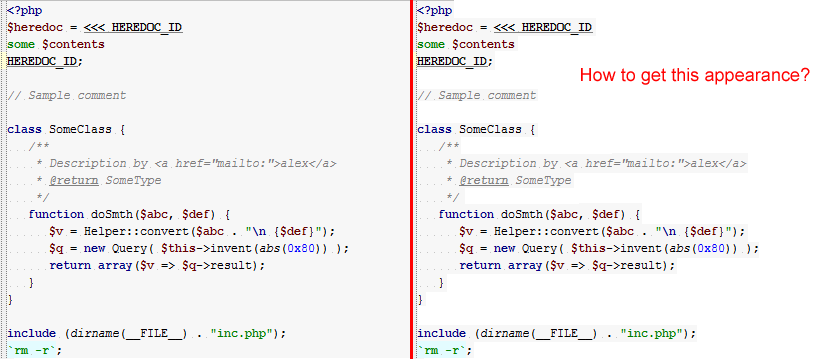
I can't find how to set the background color to be only behind the PHP code and not the white space.
Please have a look at the attached image and you'll instantly know what I'd like to achieve.
Thank you very much for your help.
Paul
Attachment(s):
editor-appearance.png
Please sign in to leave a comment.
Hi Paul,

It's hard for me to see where you want the background to be present. This is what you can achieve (I've used contrast background so you can easily see it). Possibly I've missed one element or two -- but you should have the idea:
To achieve this you will have to set background color for most styling elements individually (comments, identifiers, constants etc )
Hi Andryi,
thank you very much for your effort. I think that's a good way around.
All I want to achieve is that the all the code between <?php ?> tags is highlighted (i.e. has the background color) but not the white space at right side of the code.
In other words, all I need is to "force" the background color to respect the ends of lines. I.e. if there's an empty line, it shouldn't be highlighted at all.
I believe there's some setting for it but I can't find it anywhere.
Thanks again
Paul
There is no such setting available.
I remember seeing a ticket for introducing such setting but cannot find it right now.
That's pity. Thanks again. Martin