Conditional breakpoints in Beta 2?

Are conditional breakpoints disabled in beta 2?
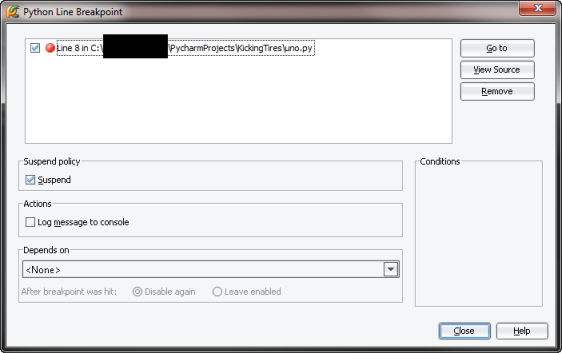
I've read the help and for the life of me I can't seem to figure out how to enter a condition, whether in edit or debug mode, let alone select/enable that condition when stepping through code. The conditions area is a solid gray and right-clicking in that space has no functionality.
Here is the help blurb:
To configure breakpoint conditions
- Select the desired breakpoint in the list.
- To set the break condition, enter the expression in the Condition field of the Conditions option group, and enable it by selecting the appropriate check box.
If the evaluation result is true, the user-selected actions are performed.
If the evaluation result is false, the breakpoint does not produce any effect. Conditions for field/method/exception breakpoints are calculated in the context for the given field/method/exception.
 - To limit breakpoint hits only with particular object instances using instance IDs, check the Instance filters option and type the instance ID value, or click the ellipsis button and specify instance ID in the Instance Filters dialog.
- To define breakpoint behavior with regards to the particular classes, check the Class Filter option and type the class filter manually, or click the ellipsis button and specify the class filter in the Class Filters dialog.
- To define the number of times a breakpoint is reached but ignored, check the Pass count option and specify the number of passes the breakpoint should be skipped before it is hit. For more information on Pass count option, refer to the Breakpoints dialog section.
Attachment(s):
PyCharm Conditional Breakpoint.png
1 comment
Sort by
Date
Votes
Please sign in to leave a comment.