Python 3 syntax

I just download the 30-day trail, and I'm having trouble getting v1.5.3 working with Python 3. I pointed PyCharm to my Python 3 dir, and it was recognized as Python 3.2, but all py3k-specific syntax is still marked as a syntax error. I couldn't find any mention of Python 3 anywhere else in the settings.
Is there something I'm missing? How do I enable support for Python 3?
Thanks in advance.
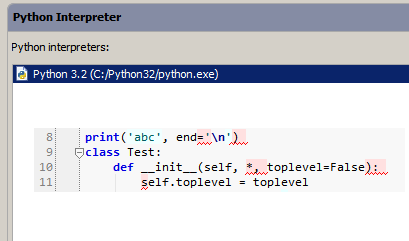
Attachment(s):
Untitled.png
Please sign in to leave a comment.
Hello John,
There is no extra configuration for Python 3 support; it's sufficient to
specify a Python 3 interpreter in Settings | Python Interpreters.
Is the file you're trying to edit located under the root of your project?
--
Dmitry Jemerov
Development Lead
JetBrains, Inc.
http://www.jetbrains.com/
"Develop with Pleasure!"
The file wasn't located under the project root, but it was located under \python32\lib\site-packages, which was listed under "external libraries". Upon further investigation, the issue occurs only within packages, not within root-level modules. In other words,
\python32\lib\site-packages\test.py -- no problem, py3 syntax and completion works fine
\python32\lib\site-packages\mylib\test2.py -- erroneous syntax errors and broken completion
I do have __init__.py files in the right places. The same holds true for other external library paths -- \python32\lib\hashlib.py works fine, while \python32\lib\urllib\request.py is broken in the editor. Could this be a bug?
(I was able to work around the problem by adding site-packages as a source root under Settings > Project Structure, but unfortunately that causes odd issues when I try to debug or run the project, so it's not a suitable long-term workaround)
Hello John,
Sorry for the problem. This is actually a bug in PyCharm, which will be fixed
in the forthcoming 1.5.4 update.
--
Dmitry Jemerov
Development Lead
JetBrains, Inc.
http://www.jetbrains.com/
"Develop with Pleasure!"
Cool, thanks for the quick response. I'll keep my eyes peeled for the update.
Also, this probably goes without saying, but except for that one hiccup I'm very impressed with PyCharm so far. This might finally be the one to tear me away from notepad!