Question regarding PyCharm creating Django views (in PyCharm example)

I've been working through the Django example using PyCharm 3.x (http://www.jetbrains.com/pycharm/quickstart/django_guide.html)and got as far as 'Creating Views'. When I click the yellow balloon I don't see two choices as illustrated (see below) – 'create Django view method' and 'create class MyDjangoApp...' – just 'create Django view method'. I'm interested in using PyCharm to create CBVs, and it looks like the second choice would do that. I'm new to Django, so perhaps I'm missing something, but how do I get PyCharm to give me the two choices? Running PyCharm 3.x, Django 1.6, Python 3.3 in a virtual env (through PyCharm) on Mac OSX Mavericks.
Thanks!
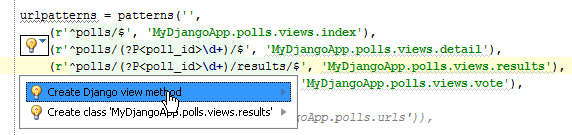
Thanks!
Please sign in to leave a comment.
Using this as your example code:
urlpatterns = patterns('',
(r'^polls/$', 'polls.views.index'),
(r'^polls/(?P<poll_id>\d+)/$', 'polls.views.details'),
(r'^polls/(?P<poll_id>\d+)/results/$', 'polls.views.results'),
(r'^polls/(?P<poll_id>\d+)/vote/$', 'polls.views.vote'),
url(r'^admin/', include(admin.site.urls)),
)
admin.autodiscover()
You need to put your cursor over the 'index' part of (r'^polls/$', 'polls.views.index') THEN click the yellow bulb.
You should now have the option to 'Create a new django method'.
Hope this helps!