Evaluate expression times out at 10 seconds: how increase it?

Am using Rubymine for building and debugging automated testing scripts (using Watir and Watir-webdriver) against browsers. When the browser takes a while to respond I can easily run over the 10 second timeout in evaluate expression. How can I increase this timeout interval? Am using 4.5.2 under Windows XP.
Please sign in to leave a comment.
You can do it in File | Settings | Debugger | Ruby
There is no Ruby option under File -> Settings -> Debugger. Are you referring to the Debug connection timeout value?
Changing the Debug connection timeout doesn't do the trick.
The evaluation times out after 10 seconds and throws a timeout exception. Even if I rescue that exception attempting to execute the next line in the script causes the run to terminate ("Thread killed").
Any other suggestions? Ruby option under File -> Settings -> Debugger does not exist.
In 4.5.4 File | Settings | Debugger | Ruby does not exist. Please respond.
Are you sure about it?
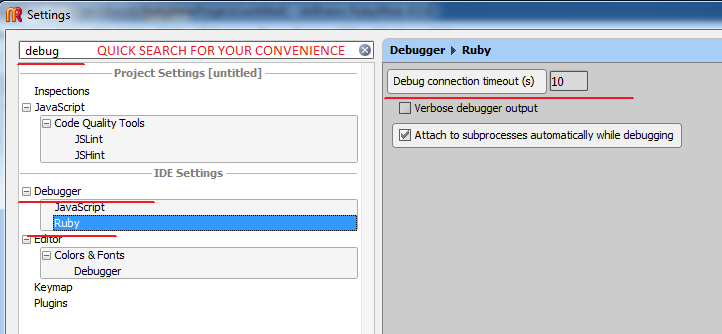
RubyMine v4.5.4
Yes, although it may be because I disabled the javascript debugger as am not using it and having performance issues with 4.5.x
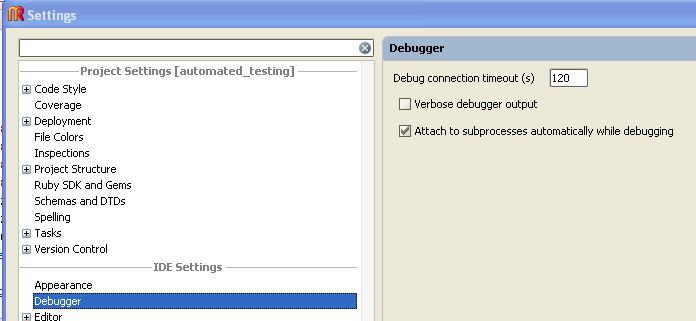
Setting for debug connection timeout does not seem to affect the Evaluate Expression timeout:
'Timeout: evaluation took longer than 10 seconds.'
pat
I do not know then.
I may only suggest submitting a ticket to the Issue Tracker (if it is not a bug then maybe it will be treated as Feature Request).
Ridiculous! So, it is still a problem after 8 years!
Is it hard to add a control so that the evaluation would not stop after 10 sec?
Have you tried changing Settings | Build, Execution, Deployment | Debugger | Debug connection timeout?