How I can I get the ManageProjectManager instance?

How can I get the MavenProjectsManager instance?
1. Is there a service, component or something else that goes in the plugin.xml to instantiate the MavenProjectsManager instance?
MavenProjectsManager manager = MavenProjectsManager.getInstance(project);
My plugin.xml file so far:
<idea-plugin version="2">
    <id>com.arcbees.plugin.idea</id>
    <name>GWT-Platform (GWTP) IntelliJ IDEA Plugin</name>
    <version>1.0.0</version>
    <vendor email="support@arcbees.com" url="http://www.arcbees.com">ArcBees</vendor>

    <description><![CDATA[
      The GWTP IDEA plugin provides tools for GWT-Platform framework in IntelliJ IDEA.<br>
      ]]></description>

    <change-notes><![CDATA[
      Project Creation by Archetype added (8/30/2013).<br>
      ]]>
    </change-notes>

    <!-- please see http://confluence.jetbrains.net/display/IDEADEV/Build+Number+Ranges for description -->
    <idea-version since-build="107.105"/>

    <depends>org.jetbrains.idea.maven</depends>

    <application-components>
    </application-components>

    <project-components>
    </project-components>

    <actions>
    </actions>

    <extensions defaultExtensionNs="com.intellij">

        <moduleType id="GWTP_CREATE_PROJECT_MODULE"
                    implementationClass="com.arcbees.plugin.idea.moduletypes.CreateProjectModuleType"
                    classpathProvider="true"/>

        <wizardMode implementation="com.arcbees.plugin.idea.wizards.createproject.CreateProjectWizard"/>

    </extensions>

</idea-plugin>
Thanks to all those who can help,
Brandon
Please sign in to leave a comment.
Please make sure that you're adding the jars of the Maven plugin to the classpath of the IntelliJ IDEA SDK and not as a separate project library.
Thank you! I had mistunderstood the depenedency locaitons for including a thirdparty plugin. It works now.
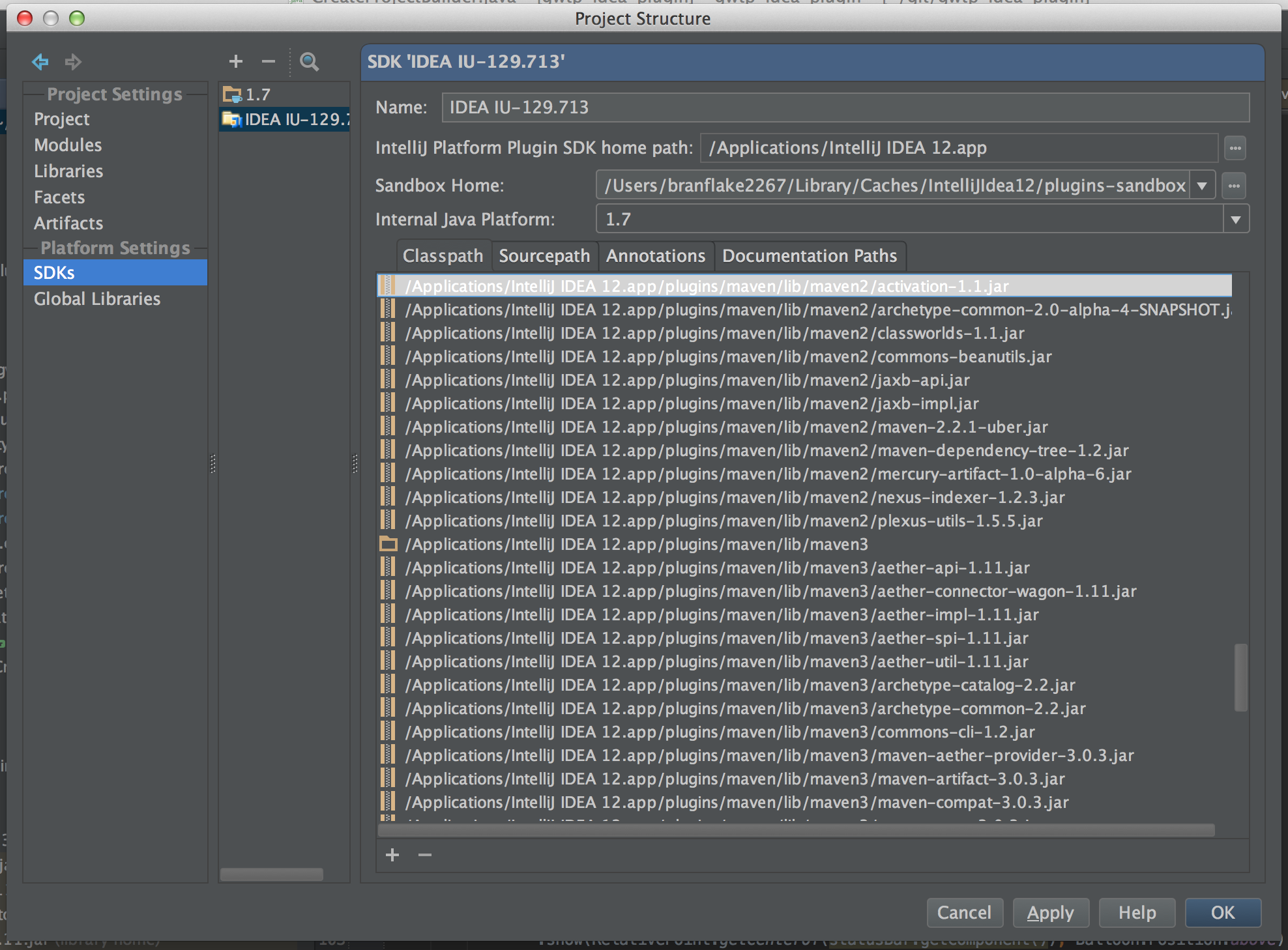
For those who follow, I attatched a screen shot of the location I added the maven plugin dependencies. On a mac they are located in the application, /Applications/IntelliJ IDEA 12.app (show package contents).
I've run into a similar problem
I'm writing a plugin using IntelliJ SDK via the gradle-intellij-plugin.
I was able to add the dependencies so far, but now that I'm trying to add Maven/Gradle dependencies they are not seen by the IDE.
I then found this post and added the jars to the SDK's classpath, but still nothing changed.
Any hint?
Ok, got it. If I use the gradle plugin I must do
intellij {
    version = '20xx.x.x'

    plugins 'Maven', 'gradle'

}
Ok, the previous resolves the depends tag in the plugin.xml
However, I still cannot import classes. E.g.

I've create a specific request here: https://intellij-support.jetbrains.com/hc/en-us/community/posts/360002396080-How-can-I-import-Maven-and-Gradle-bundled-plugins-in-my-IDE-using-gradle-intellij-plugin