Intellij 12 - Not getting continuous compiler error in editor

Suddenly, IDE stopped showing compiler error in lines.
Now I am only getting when I am building it or Ctrl+Shift+F9
See the following error. 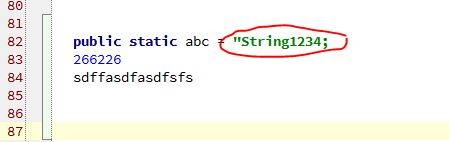
Today I got a plugin update, I forget which plugin.
Anywey to fix this?
Please sign in to leave a comment.
looks like something wrong.
autocomplete and override indication to go to object and interface is also not working.:O
Just to make sure: is this Java?
In any case, main menu / File / Invalidate Caches and Restart may help.
Regards,
Alexander.
Yes, it's java.
Thanks for your input. I will let you know if your solution works.
Invalidated cache, Still not working.
It's like I am writing code on notepad :(
1. Does the same occur in new created java class?
Could you also attach screenshots that show the following:
2. How problematic file(s) / class(es) icon looks in the Project tool window.
3. How the editor tab of this file(s) looks.
Thank you,
Alexander.
Message was edited by: Alexander Chernikov
I reset my IDE. Deleted .IntelliJIdea12 configured project from begining.
Now its working fine.
Sorry I didn't had time for debugging.
Thanks
Anoop Kumar