Display of message translation on hover

Hi,
I recently upgraded from IntelliJ 9 to 11.
One of the changes I noticed is the behaviour when using message resouces in my code, with multiple languages.
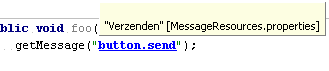
In IntelliJ 9, when I hovered over a resource key with my mouse pointer, while pressing control, the 'default' translation was shown in a popup (see intellij9.png).
In IntelliJ 11, when I do the same, a balloon pops up which reads 'Multiple implementations' (see intellij11.png).
While the message in the balloon is correct, I would much rather see the default translation, as was the case in IntelliJ 9.
Does anyone know if it is possible to revert to the behaviour of intellij 9 in 11, using some kind of setting?
Thanks,
Guno
Attachment(s):
intellij11.png

intellij9.png
Please sign in to leave a comment.
Youtrack issue:
http://youtrack.jetbrains.com/issue/IDEA-76594