Launching the Virtual Device on Run of Project

Hi,
I'm new to android app development and i'm trying to start with IntelliJ IDEA.
I have create a "Hello World" app and when I'm trying to run the application, even though I have a Virtual Device selected, nothing comes up. The log shows the following information: (but nothing happens)
Waiting for device.
"C:\Program Files\Android\android-sdk\tools\emulator.exe" -avd MyAvd0 -netspeed full -netdelay none
Any help is much appreciated.
Also, attached you have my settings when you enter 'Edit Configuration'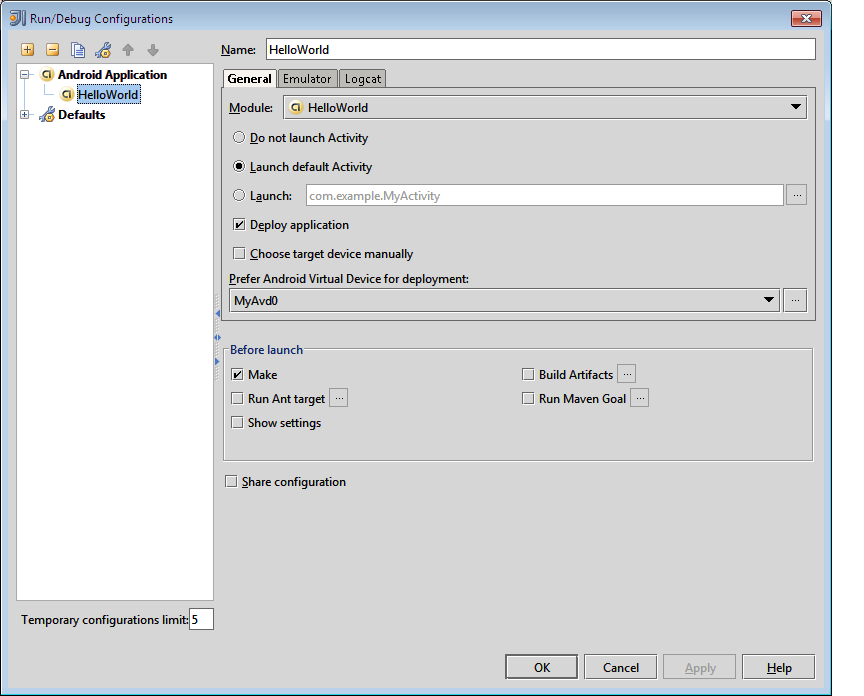
Please sign in to leave a comment.
Hello, Josef
Does emulator start after it? If so, please wait, when emulator will be completely loaded and then try to launch your application again. But if the emulator doesn't start and you don't see any errors, please submit an issue to our tracker and attach idea.log file to it.
I have the exact same problem. I have followed the instructions on http://wiki.jetbrains.net/intellij/Developing_Android_applications_in_IntelliJ_IDEA but when I get to the part about starting the application all I get in IntelliJ is
and then nothing happens. Did you get this solved?
/Dan