Project folder setup / Newbie question

Hello. I'm just starting to use the PhpStorm IDE and most things are straightforward. But I have a problem understanding how to set up the folder structure for my existing projects. I have a similar structure:
/ - project root
/application - my web application
/public_html - the public documents (ie bootstrap file, js, images etcetera)
Mostly I use a local web server for testing where I set the web root = the /public_html folder for the project, and a remote web server (domain hosting) for the production environment.
I have a little hard time to understand how to set up this (apparently simple) setup in PhpStorm. When I start up a new project from existing files I can set the project root but it seem that the web root can't be a sub folder of the project root with simplicity? Please can anyone explain this?
Please sign in to leave a comment.
Hi there,
This IDE does not have dedicated "this folder is a web site root" kind of setting. In general, project root is treated as website root.
Please describe what problems you are having (which areas). Depending on a problem it can be resolved in certain way (e.g. I do have similar setup in almost every project and I have no issues working with code/deployment in this IDE).
OK, I really dont have any specific issue with this yet except the fact that I don't feel comfortable with not setting the web root directory in the project set up wizard. What about commands like "Open in Browser" and similar? I been working with IDE's where web root settings is crucial to the function, like live updating of the browser window, FTP sync, etcetera.
Would there be any use to mark the web root directory as a "Resource root" folder? (The help pages say: "By assigning a folder to this category, you tell PhpStorm that files in it and in its subfolders can be referenced relative to this folder instead of specifying full paths to them.")
Yes -- this way URLs like src="/assets/images/logo.png" will be resolved relative to the website root (your public_html folder) instad of inorrect (in such context) project root.
Configure deployment mappings -- URL is taken from there.
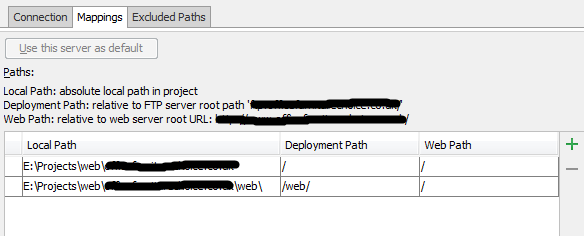
HINT: 2 different local folders can be mapped to the same web URL
Great Andriy, that answered my question! Now back to coding! :)