"No Go SDK defined for this project" - getting this message in WebStorm

Hi,
Using WebStorm 10.0.3 and installed the Go plugin.
Here is what my configuration looks like: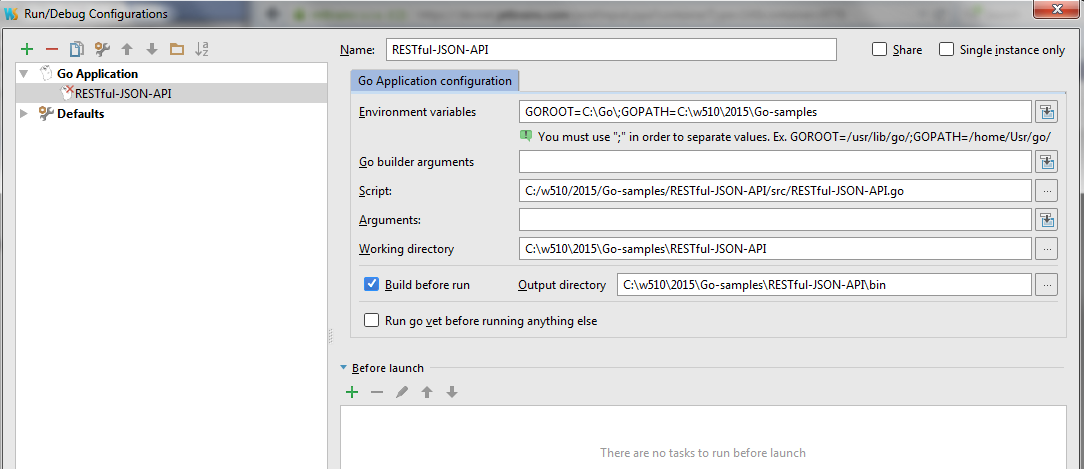
On running I get "No Go SDK defined for this project". What am I missing?
Thanks.
Please sign in to leave a comment.
Please specify a path to Go SDK in Settings/Languages & Frameworks/Go/Go SDK
See https://github.com/go-lang-plugin-org/go-lang-idea-plugin/wiki/Documentation#setting-up-the-go-sdk for information
I have installed Webstorm 11.0.4 and go version go1.12.4 windows/amd64 on a Windows 10 OS.
Webstorm asks to set up the SDK. I select my Go install directory (same as my GOROOT environment variable) to F:\go. Webstorm recognizes the correct version. However, when I click OK, the SDK remains unrecognized.
Does the SDK have to be installed in a specific folder?
I tried to copy the go SDK folder to C:\go. When I use that location, the same things happens (the SDK remains unrecognized).
Please let me know what else I can try to get Webstorm to recognize my SDK.
Kind regards,
Chris
This Go plugin version is very old and not maintained anymore, see https://github.com/go-lang-plugin-org/go-lang-idea-plugin/#deprecation-notice
Most likely the problem is that it's not compatible with current SDK versions