[Solved] Where do I change this color in a phpstorm style?

See the attached
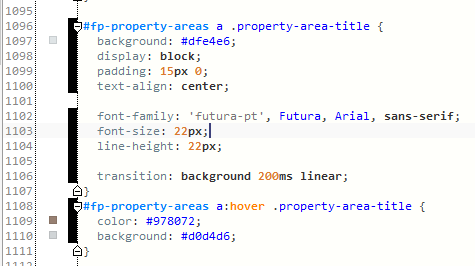
I'm making a custom theme for PHPStorm to mimic Notepad++. It's about done. There's a black bar next to line numbers, in the area where you can collapse/expand blocks of code. The background is just black.
Where can I change or remove this coloration, and what is it for? It doesn't even line up with the code.
Attachment(s):
PhpStorm_2015-057-11-58-59-79.png
Please sign in to leave a comment.
Hi there,
Have you edited that file in IDE? Right now it looks like it's an VCS status (added/edited lines). If so -- look at "Colors & Fonts | General | Added/Modified lines"
Oh that's what the colors are! That makes sense, I'm using Git as the VCS.
And yes, Added and Modified Lines both had the background checkbox unticked. I guess they fall back to black and white. I've been ignoring it for so long and then suddenly it would go away (when I committed changes), and I never connected the dots. lol.
Thank you!