sometimes that is difficult to find place of error

Hi,
In my phpStorm 7.1.3 if I have some syntax error, I see red wave underline in header tab of page and some red wave underline lines in code:
http://i037.radikal.ru/1406/2f/6be40c77d2ac.png
But problem is that if file in editor is big, sometimes that is difficult to find place of error . I would like some action "Jump to error place" and maybe to mark error place with more visible marks.
Can I do this now ?
Thanks!

Please sign in to leave a comment.
Hi there,
1)
Settings | Editor | Colors & Fonts | General | Error (and/or Warning)
2)
Navigate | Next Highlighted Error
Navigate | Previous Highlighted Error
3)
Click on Error marker on scroll bar ?
4)
"Code | Inspect Code... | Current file" ... and then navigate between ALL errors/warnings/etc
1) I did not find what you mean
http://s019.radikal.ru/i638/1406/64/4043e13aa32f.png
Please, clarify.
As for the rest, thank yuo, it is very helpfull!
1) In case of a doubt -- use search box (top left corner)
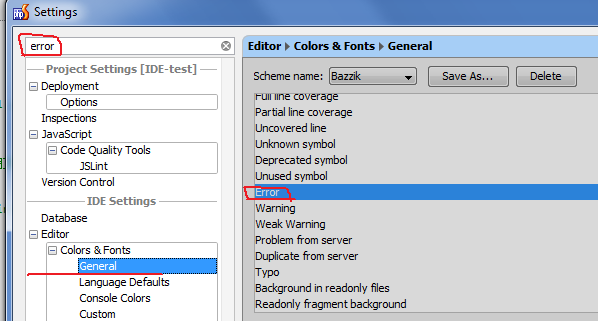
2) .. or just type word "error" or "warning" when in the list of styles
Use key F2