Phpstorm 7.1.3 Problem - Css file's not recognized

Hello,
I've been working with PhpStorm for quite some time now. And never had any problems with it.
However, I had to do something with FileWatchers, to be able to use SASS en SCSS.
After I did this, my Css files are not recognized anymore.
When I create a css file, all text is gray. And not a single tag is shown with colours etc.
Also, when I type the first 3 letters, like "bac" for background-color, there are no possible tags shown.
I tried everything, and can't seem to get it fixed.Im working on a Macbook Pro, using PhpStorm 7.1.3
Below an image of how my css looks right now: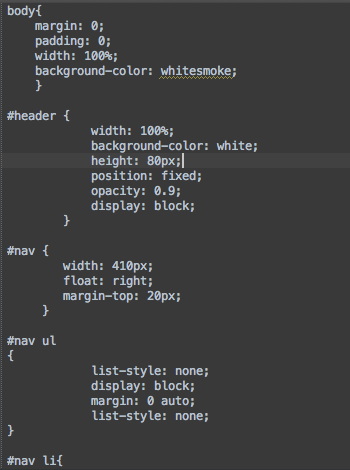
All help is appreciated a lot.
Thanks in advance!
Please sign in to leave a comment.
Hi there,
1) Please show the whole file (whole editor tab -- I want to see an icon) and not just fragment of it.
2) What is the file name? Please show a screenshot of it from Project View panel
Hope this is good enough, Would love to have this fixed. Hard to do some fast styling this way :(
Based on file icon this file is treated as plain text file.
1) Preferences | File Types
2) Text files
3) Find and delete offensive pattern (most likely will be "stylesheet" or similar)
Worked indeed. Couldn't figure this out
Thanks a lot! :D