WebStorm Syntax Highlighting Concerns

Hello!
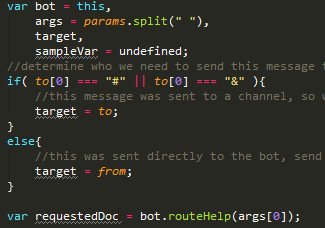
I'm wondering if anyone else has run into this issue. I'm looking to migrate to WebStorm from sublime text, which has FANTASTIC syntax highlighting for javascript. WebStorm also has pretty good highlighting, except that I can't figure out how to highlight 'undefined'. It also lumps conditional/control statements such as 'if/else', 'switch/case' etc into the keywords group with 'this', 'var' and similar.
Is there any way to get at least 'undefined' highlighted properly as a keyword? I'm hoping I'm just missing something because I'm loving the rest of the IDE. Many thanks in advance for taking a look!
Attachment(s):
sample.jpg
Please sign in to leave a comment.
No, there is no way to do this.
If the basic syntax highlighting is all you need, you can disable JavaScript plugin and search for existing textmate bundles for .js files in the web, import them and use for the .js syntax highlighting - see
http://blog.jetbrains.com/phpstorm/2013/05/textmate-bundles-in-phpstorm/ and
http://stackoverflow.com/a/16451778/2000323 for more info
But you will lose most of IDE features if you go this way
Bummer!
Well, I think I can live with the built-in highlighting, but I may experiment with using a textmate bundle. Thanks so much for your response!