Can't always get "associate with file type" option...

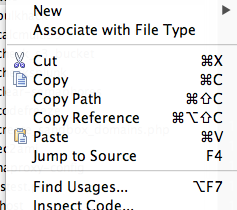
This doesn't feel like a bug, and I suspect there is some logic here that I simply haven't figured out. In the project pane, sometimes I can right click a file (typically one without an extension) and an option appears to "associate with file type."
For some reason, this option doesn't always appear and I'm not sure why. I'm not talking about cases where I've already selected this option, but instead cases where it is a brand new file. Can anyone explain to me how this feature is supposed to work (or if it perhaps *is* a bug)?
Attachment(s):
Screen Shot 2012-09-17 at 5.17.11 PM.png
Please sign in to leave a comment.
Hi Nick,
It works exactly how you described it: if PhpStorm cannot find association for this file with ANY file type (Settings | File Types) then this option is present. It is usually the case for files with no extensions (in such case the template/pattern matches file name, e.g. README, LICENCE etc) or files with completely unknown extensions.
Thanks for the clarification. So in that case, if I am experiencing this issue with files that do not have an extension, would I be correct in interpreting that as a bug?
No -- I have updated my description a bit to make it bit more clear (some words were missing which was giving different meaning when reading without them):
If PhpStorm cannot find association for this file with ANY file type (Settings | File Types) then this option is present -- this is correct behavior and therefore it is not a bug.
You can treat it as a bug IF you can have assiciation (some pattern that matches this file name) but this option is still present.
Ah gotcha. So I seem to be having this problem with files of seemingly arbitrary names. For example, I've got 3 shell scripts with the names "app," "bedrock," and "bed." Only "app" gives me the option to associate with a file type. The other two aren't showing this option (and haven't previously been associated with another file type, nor do they have any syntax highlighting, which leads me to believe the IDE isn't aware of any file type). In another project, I have an entire directory full of arbitrarily named extension-less files that do have this option.
I can't for the life of me figure out what is different about those two shell scripts other than the fact that they are alone in their own directory, but still within the project.
So right now, I'm basically experiencing the inverse of this. A couple of files that don't have this option present, but also don't have any association (at least as far as I can tell).
Cannot advise without seeing your settings and screenshot of how it looks (the files in Project View panel) -- what icons they have?
Settings | File Types -- check for possible patterns there.
File where such patterns are saved (in case you have added it somehow): C:\Users\USERNAME\.WebIde50\config\options\filetypes.xml
Ah I see what is happening now. When you select that option, the file name gets added to the list of patterns for that file type. I didn't realize this, and thought the IDE was just internally marking that one file as a given type (so if I deleted it, the association would die with it). Removing the references in preferences has restored my ability to select a different file type. Doh! :-)