New UI - Database Colors do not show in "Open Anywhere" Dialog (Ctrl+N)

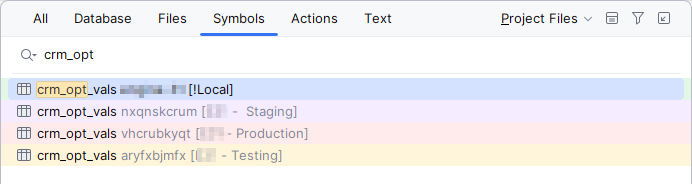
I just upgraded to the new version of Datagrip which requires the New UI. I'm slowly getting used to where everything is, but I noticed one glaring oversight: When I'm searching for a database table by name (Via the Ctrl+N shortcut), the colors that I have set for my databases do not show in the UI anymore:

Switching back to the Classic UI doesn't seem to show the colors either.
This is a huge problem for me, since I have my various production/testing/staging database color coded so I can avoid stomping on production.
It does look like the color coding works in the “Symbols” tab, so I suspect this is just an oversight.
Please sign in to leave a comment.
Oh, looks like there is a fix for this, just not released yet:
https://youtrack.jetbrains.com/issue/DBE-21211/Go-To-Database-Object-window-missing-color-settings
The tracker issue you provided above is exactly what you're having. A fix should be in one of the upcoming bugfix versions.