No more git in file popup menu
Answered

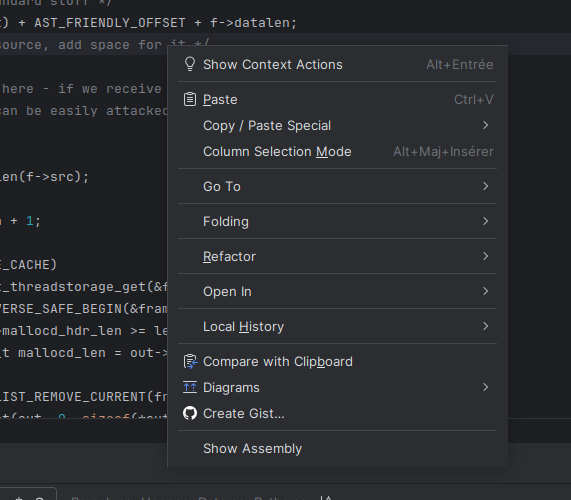
Since the upgrade to 2025.1, I do not see anymore the git submenu in popup menu when I right click on the editor.
I opened an issue, but no answer yet.
Any idea ?
Worked in 2024.X
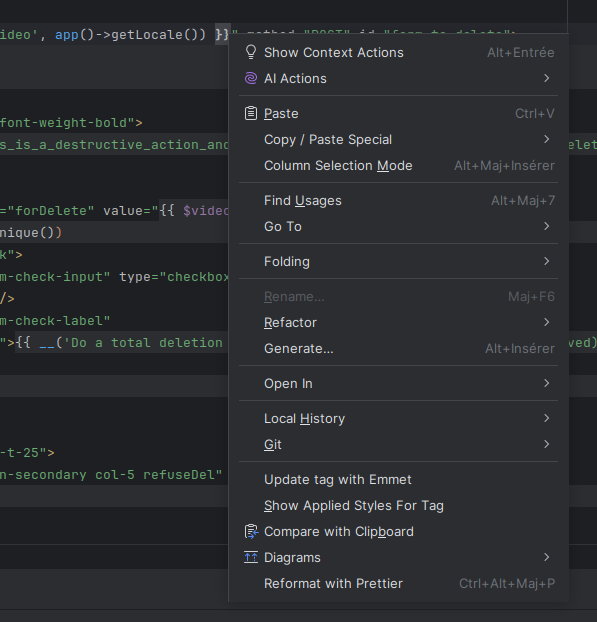
Git does not show any more in 2025.1
Please sign in to leave a comment.
I'm in the same case. no git context menu.
And since the last PhpStorm update (2025.1 Build #PS-251.23774.436, built on April 14, 2025), it doen't ask me to add new files.
I have the problem for all my projects.
I'm under Linux Ubuntu 24.04
Hi all,
Please check: https://youtrack.jetbrains.com/issue/IJPL-181017
Are you using symlinks?
Yes I will try the solution
Bonjour,
No, I don't have a symlink.
I have redone the VCS Directory Mappings, but no change, the git contact menu is already missing.
Cedrik SIBOLD
Could you please share some screenshots that show your IDE window, with the mentioned issue?
Are the rest of the Git related operations working fine - Main Menu > Git, Commit tool window, Git tool window? Only the git section in the context menu (right-click) is missing?
Does it occur for all projects or only specific one? Could you also please share a screenshot of the Settings (
⌘ + ,orCtrl + Alt + S) > Version Control > Directory Mappings page?You can zip the files and upload here: https://uploads.jetbrains.com, just provide the uploaded file ID. Thanks!
Hello Ivan,
Thank you for your post. The ID is 2025_05_12_2ZGi82rdXQ2LvSfSQ5FyJ2 for the two uploaded screenshots (Context-Menu and Directory_Mapping)
I have another issue: when I create a new file, PhpStorm doesn't ask me to add it to the Git branch; I have to add it manually.
Thanks.
Cedrik SIBOLD Thank you for the screenshots.
Do you have the same issue occur in all projects, or only this particular one? Could you try to create a new simple project with a git repository (enable the Create Git Repository option) and check if the Git context menu option is missing?
Also, in the affected project, could you please try to remove the second entry in the Settings (
⌘ + ,orCtrl + Alt + S) > Version Control > Directory Mapping - (/mnt/…), just as a test. You can copy this path to be able to restore it quickly afterwards.Hi, I did this, but nothing changes: no Git context menu, even after restarting PhpStorm.
This issue affects all my projects.
Cedrik SIBOLD Hm, it is strange. Have you tried to do the following?
Could you also share your IDE logs (Help > Collect Logs and Diagnostic Data)? You can upload the zip file here: https://uploads.jetbrains.com, just provide the uploaded file ID. Thank you.
Same issue with 2026.1.1 and Ubuntu 24
I realized by change that it happens only in my second monitor if the window is maximized, in the integrated monitor either maximized or not the git submenu appears. it's boring.
EDIT
I have the following configuration
MON 1
MON 2
MAIN MONITOR
The pop-up menu does not appear in MON1, but if I move PyCharm to MON2, the pop-up menu appears in MON3
This does not happen with other sub pop-up menus
Csicari
Thank you for the report!
It is a known issue in the 2026.1 release with a multi-monitor setup: https://youtrack.jetbrains.com/issue/IJPL-242548.
Please try the workarounds mentioned in the original report: https://youtrack.jetbrains.com/issue/IJPL-242548/Git-menu-Does-not-display#focus=Comments-27-13689904.0-0.