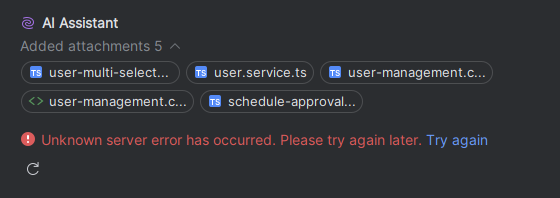
WebStorm AI Assistant Claude 4: Unknown server error has occurred.

Over the past few days, I’ve been frequently encountering the following error when using the Claude 4 model in the AI Assistant plugin:
"An unknown server error has occurred. Please try again later. Try Again."
I have an Ultimate AI Assistant subscription, and everything was working fine until recently

Please sign in to leave a comment.
I am now experiencing the same problem with the same model and Free AI Assistant. Sometimes, the AI starts answering before the error message above appears.
My IDE settings:
WebStorm 2025.1.3
Build #WS-251.26927.40, built on June 20, 2025
Source revision: ce471299dab0d
Subscription is active until December 7, 2025.
For non-commercial use only.
Runtime version: 21.0.7+9-b895.130 aarch64 (JCEF 122.1.9)
VM: OpenJDK 64-Bit Server VM by JetBrains s.r.o.
Toolkit: sun.lwawt.macosx.LWCToolkit
macOS 15.5
GC: G1 Young Generation, G1 Concurrent GC, G1 Old Generation
Memory: 2048M
Cores: 8
Metal Rendering is ON
Registry:
ide.experimental.ui=true
Non-Bundled Plugins:
org.jetbrains.completion.full.line (251.26927.999.1)
bundled-webstorm-help (251.26927.40)
org.jetbrains.junie (251.204.122)
com.intellij.ml.llm (251.26094.80.22)
org.jetbrains.plugins.gitlab (251.26927.54-IU)
org.jetbrains.plugins.github (251.26927.54-IU)
com.github.biomejs.intellijbiome (1.9.0)
I have the same issue with Goland intermittently.
Hello,
On July 25, we experienced a brief outage on the Anthropic side that might have caused this issue.
You can find more information here: https://status.jetbrains.ai/history
If you are still encountering the problem, please create a support ticket (https://www.jetbrains.com/support/) and attach the debug logs or upload logs (https://uploads.jetbrains.com/) and provide the Upload ID in the thread so I can investigate it further.
You can collect debug logs by following these steps:
com.intellij.ml.llmcom.intellij.util.io.HttpRequestscom.intellij.util.proxy.CommonProxy-Djdk.httpclient.HttpClient.log=ALLThank you!