Docker compose target

Dear all,
I wrote a question on STO but I though this place might also be appropriate.
I am working on a Rust project. My application depends on a database and another simulator service that exposes different TCP ports. I have 2 docker containers for those services. My goal is to be able to run my application from CLion in a docker container that can interact with the 2 services. I thought of using a Docker compose run configuration.
Here are the steps I followed
- Create a docker image where my application can be built and run. I have a build configuration (with a docker target) that uses this image and it builds correctly.
FROM rust:1.89-slim-trixie

ENV PATH="/usr/local/lib:${PATH}"
ENV LD_LIBRARY_PATH="/lib:/usr/lib:/usr/local/lib:/usr/lib/x86_64-linux-gnu"

RUN apt update \
    && apt install -y libssl-dev \
    && apt install -y pkg-config \
    && apt install -y libpq-dev \
    && rm -rf /var/lib/apt/lists/*

WORKDIR /app

EXPOSE 3000
2. Create a docker-compose file with my other services, like so
services:
  postgis:
    image: postgis/postgis:12-2.5-alpine
    environment:
      POSTGRES_DB: my_db_name
      POSTGRES_USER: postgres
      POSTGRES_PASSWORD: ""
      POSTGRES_HOST_AUTH_METHOD: trust

    volumes:
      - db_data:/var/lib/postgresql/data


  app:
    image: rust_runtime
    tty: true
    command: sleep infinity

  sim:
    build:
      dockerfile: Dockerfile
      context: dataSimulator
    ports:
      - "8001:8001"

volumes:
    db_data:
3. Create a CLion cargo run configuration like so
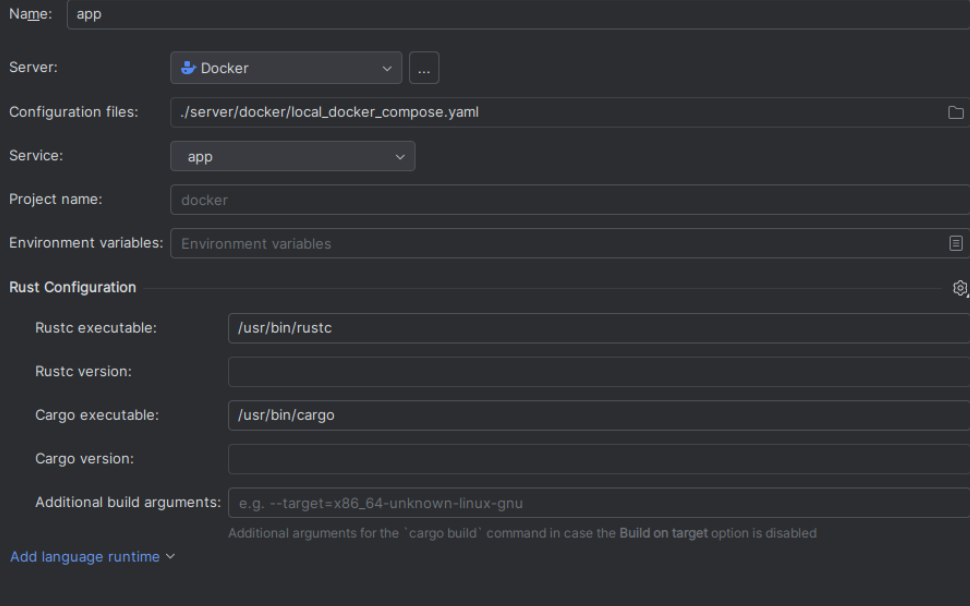
I checked and the paths to rustc and cargo are correct.
4. Start docker compose. All services start
5. Run the configuration. I get the error: Error response from daemon: failed to create task for container: failed to create shim task: OCI runtime create failed: runc create failed: unable to start container process: error during container init: exec: "/usr/bin/cargo": stat /usr/bin/cargo: no such file or directory: unknown
What is going wrong? When I do a run configuration as a docker target (not docker compose) with the same docker image, I can build and start my application (but it fails as the other services required are not present)
Questions:
- Do I need to mount my code in the container?
- How does CLion interacts in the container, does it copy my source code?
I could not find much documentation about this feature apart from https://www.jetbrains.com/help/clion/docker-compose-run-configuration.html
Please sign in to leave a comment.