Cucumber step definitions are erroneously reported as undefined in both IntelliJ and Pycharm (Python)
Answered

Problem description:
I'm using Python.
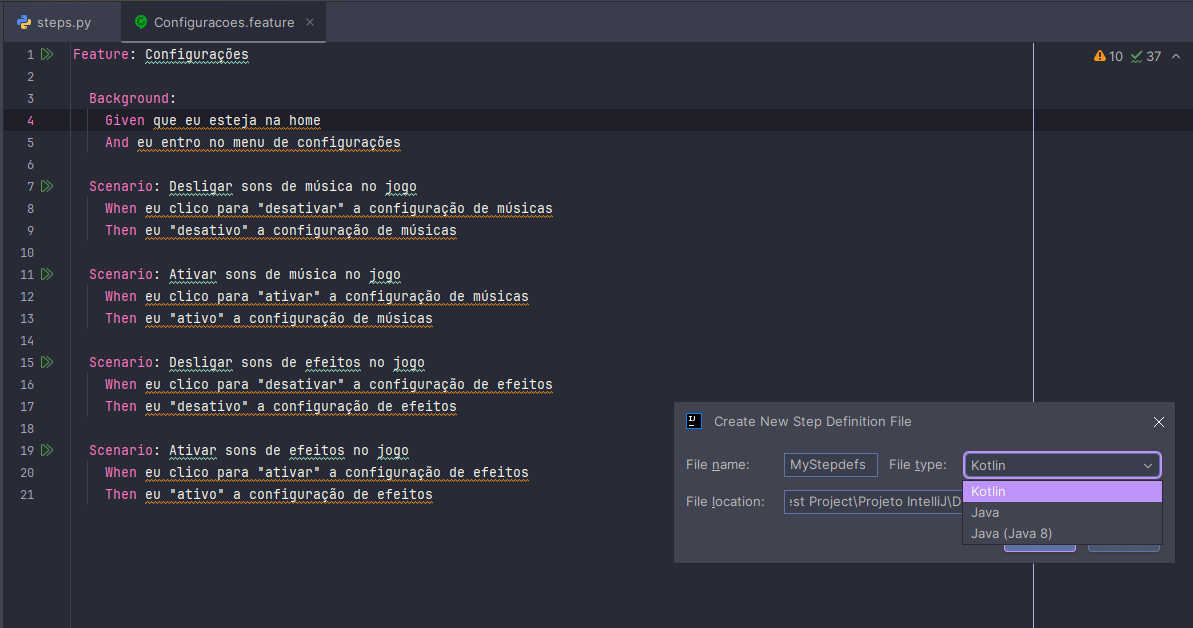
When I create a .feature file, I get a warning saying it couldn't find the steps definitions for Cucumber. So, when I try to create it (which only appears in IntelliJ; it doesn't appear in Pycharm), it only shows me other languages, even though I need Python.
Steps to reproduce:
- Create a new Python project
- Add a new feature file
- Define a scenario with at least one step
- Either use quick fix or manual file creation to implement the step
- Navigate back to the feature file
Environment:
OS version: Windows 10 22H2
IDE version (you can check via About dialog in the Help or App menu): IntelliJ IDEA 2025.2.2 (Ultimate Edition)

Please sign in to leave a comment.
Do you have all the required plugins installed and enabled? On my side, on a brand new project, it does show the option on a Python Project in IntelliJ IDEA and PyCharm
If you can reproduce the behavior on a brand-new project as well, please create a new bug report on YouTrack, and please attach the zipped IDE log files from Help | Collect Logs and Diagnostic Data as additional investigation is required
Yes, I have all the plugins (I even added more to see if it would work, but it didn't).
I installed Behave and Pytest-BDD according to the documentation (pip install ...) in the project's terminal and then installed them in the PC's command prompt. I'm currently using Python v3.13.7 and used a virtual environment to create the project.
I also created another project from scratch today, but the option to create with Python Behave or Pytest-BDD still doesn't appear, and I get warnings. I tried using the Community and Ultimate versions of IntelliJ, but neither worked.
We need more details on this case as it can be easily replicated. Please upload the zipped IDE log files from Help | Collect Logs and Diagnostic Data at https://uploads.jetbrains.com/ and share it's uploadID, or create a new bug report on YouTrack