Dimmed function comments
Answered

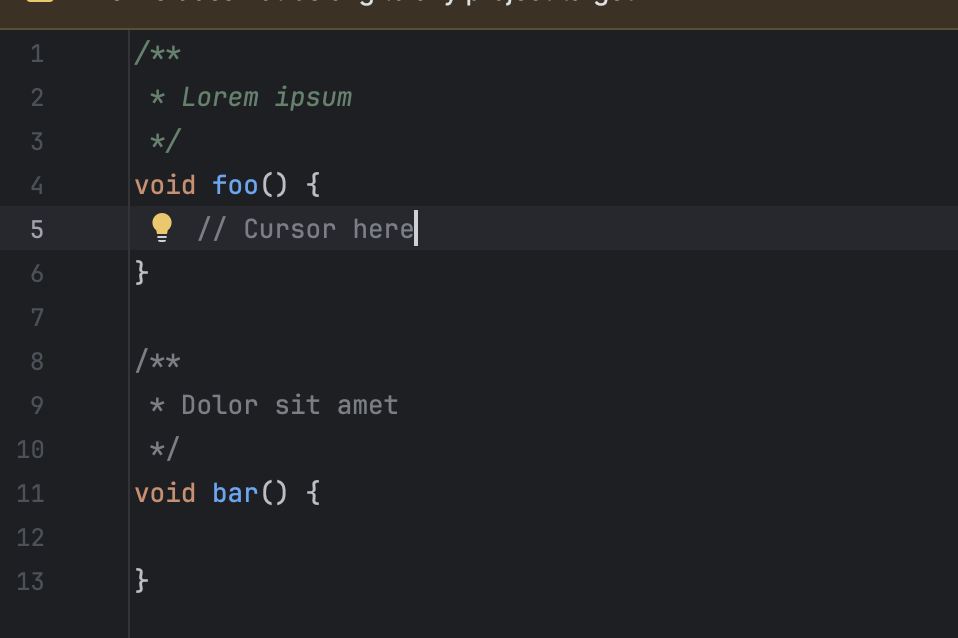
I've noticed that after updating my IDE version (I think my old one was 2025.1?), when editing code, only the documentation for the function I'm editing is highlighted in green, whereas other functions have their docs rendered in gray just like regular comments.
Is there a setting to disable/revert this behavior? I'd like function docs (doxygen/javadoc) do always be shown in green.
Please sign in to leave a comment.
Hello!
In the provided screenshot, I see that a warning is shown at the top of your file. Is this the warning that the file doesn't belong to the project? If so, this is the reason why code insight features don't work reliably. CLion needs some context to resolve the code correctly.
Please either add the file to the project or add the
main()function to it and run this single file (https://www.jetbrains.com/help/clion/run-single-file.html#rundebug-file-gutter).