Insert "Import from ..." no longer appearing as Context Action

I have used Webstorm for roughly 3 years now and always been able to import a missing module via the Context Menu .
Writing in JS (no TS, so no tsconfig file), React with MUI framework. So for example, I could declare JSX in a function return (<Box ….> ) and be able to get a Context action to insert "import Box from @mui/material/Box”.
Since the last update (2025.2.3) this has stopped working and the menu item no longer appears. (The menu appears but that option is not there)
I have tried:
Restarting, Plugins up to date, Invalidated Caches', Toggled Auto import (under Pref→Editor→General→Add Javascript import)
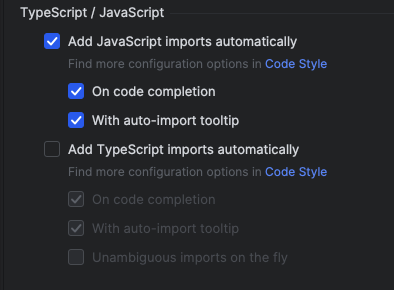
Any suggestions as to where to look would be much appreciated.
Please sign in to leave a comment.
Unfortunately I failed to reproduce the issue.
Can you try narrowing the issue down to a sample repo and share it with us?
After updating to 2025.2 I also encountered this issue and found it incredibly annoying for weeks.
You used to be able to reliably auto import when pressing `Ctrl + Enter` which would then bring up a menu to choose a component from which would then be automatically imported.
It seems you now need to use `Alt + Enter` to get a menu for importing.
I take back my comment above. Even though this does eventually work, it can take absolutely bloody ages sometimes.
I older versions I was just able to `ctrl + space`, choose the thing I want to import with the up/down arrows, press enter and it imported. This is no longer working. Its so frustrating I've gone back to using VSCode.
Eitan Elbaz the issue looks very similar to WEB-75418 that is fixed in the 2025.3.1 update. Please refer to https://youtrack.jetbrains.com/issue/WEB-75418/React-mui-material-ui-issues-in-PHPStorm-and-Webstorm#focus=Comments-27-12931896.0-0 for more information.