Issue with autocomplete

So I'm not sure when this started but I think for the past month or so I've had a fight with datagrip's autocomplete on the where clause. For some reason when I try to type out columns in the where clause after selecting the table it just doesn't show me the columns unless I add a name to the table.
Some screenshots for illustration
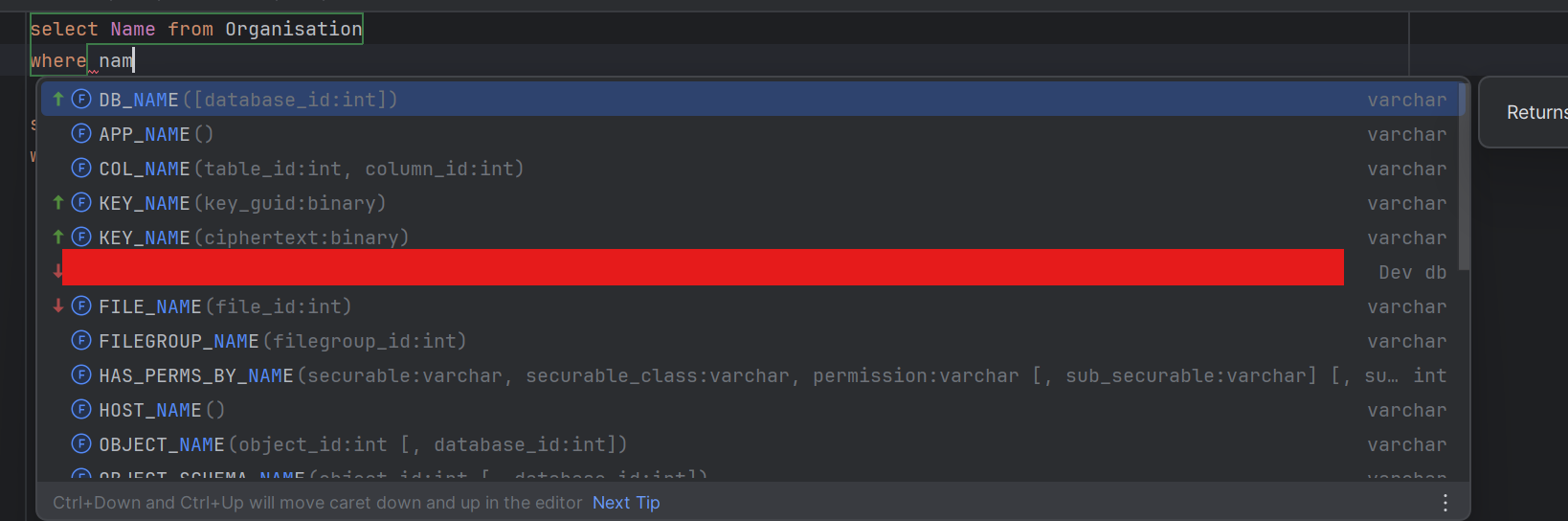
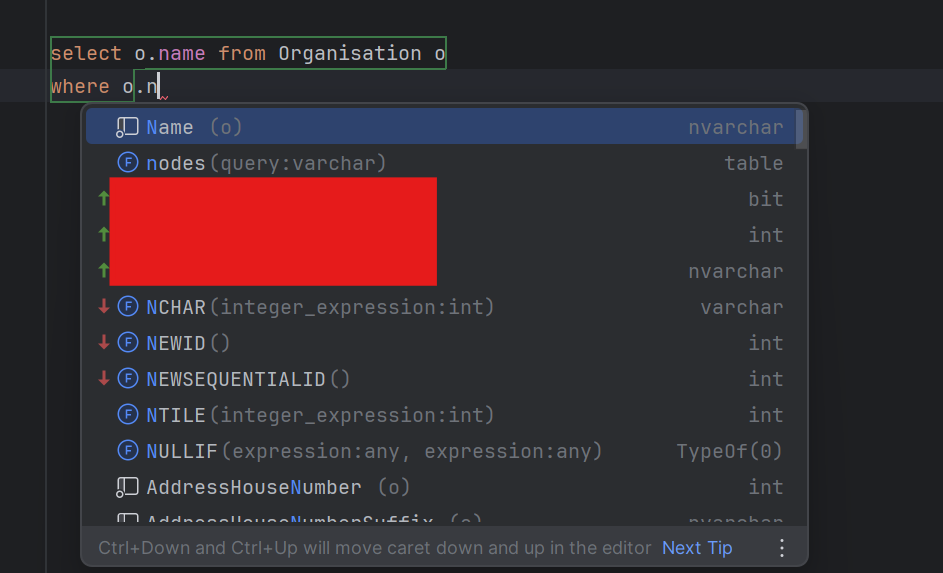
I would expect the autocomplete to be the same in both cases but it's not for some reason.
It does work for some tables as I expect. It generally happens for tables that exist on multiple databases within the azure db server.
This used to work fine, at first I thought it might be my recent upgrade from 2024.2 but I tried downgrading back and it is an issue there too now. Which makes me wonder if there is some sort of setting that I'm overlooking.
I've tried disabling all my plugins, but that doesn't seem to be the issue either.
I'd appreciate if anyone could help me with this, as this is driving me mad.
Please sign in to leave a comment.
Am I correct that the problem with completion in column filtering happens for SELECT statements, where you include all columns via * asterisk? If you explicitly specify a column and type it in the WHERE, the completion prompt shows that column.
Are you referring to external tables or data sharing you have set up on your server?
The completion settings can be found in File | Settings | Editor | General | Code Completion. The first settings at the top should be of interest to you, and you can experiment with them. However, this appears to be more ike a bug, rather than a misconfiguration.
Do you observe the same behavior in the recent 2025.3 EAP version?
No actually, even if I specify the columns, not using the asterisk, the auto completion behaviour remains unchanged.
This indeed only seems to happen in SELECT statements, UPDATE and DELETE autocomplete works as expected, as does the auto complete within the SELECT. Just the WHERE clause
I mean this is within an azure sql server that has many independent database that have been introspected within dataGrip. Some of those databases have the same tables with similar columns as other databases on the server. So within the same data source there are multiple databases with overlapping schemas. Note I did briefly try to recreate this in a minimal fashion my my local sqlserver, but that did not cause the issue.
I played with these a little bit, but none seem to change anything fundamentally, nor would I expect them to based on their description.
Yeah, I think one of the 2025.3 EAP versions was actually the first version I noticed it in before I tried downgrading, though I'm not a 100% sure any more.
This issue seems to be transient, as we haven't received any reports with similar behavior. We'll try to reproduce it. In the meantime, please find the idea log in Help - Show Log in Files and upload it onto our FTP https://uploads.jetbrains.com/
Please don't forget to include your upload id in your reply
Upload id: 2025_11_11_KPNB7jrbRnEACSqgFzWDpu (file: idea.log)
As requested I've uploaded logs, however I did reset the logs and reproduced the issue as I felt there was some sensitive data in the original logs so it's a bit minimal, I hope it will still be of aid.
We'll need some time to run our tests and make them more identical to yours. We'll update this thread as soon as we're done with it.
The FTP link has expired, and we'll likely need to report this to our tracker if the issue is present in 2026.1 EAP. Please upgrade your IDE and check again.
If the issue is reproducible, please upload the idea log, and we'll file an issue for further investigation.